As you consider upgrading your PC’s network capabilities, it’s essential to explore the best PCI Express Ethernet cards available in 2025. These cards promise to enhance your connection speed, reduce latency, and improve overall performance for gaming, streaming, or everyday tasks. With various options on the market, knowing which card suits your needs can make all the difference. Let’s take a closer look at the top contenders that can transform your online experience.
TP-Link 2.5GB PCIe Network Card (TX201)

If you’re a gamer or a heavy internet user looking for a reliable network solution, the TP-Link 2.5GB PCIe Network Card (TX201) is an excellent choice. This adapter delivers speeds up to 2.5 Gbps, making it 2.5 times faster than standard Gigabit Ethernet. It’s compatible with various Windows versions and Linux, ensuring broad usability. The card features Quality of Service (QoS) to prioritize gaming performance, while Wake on LAN lets you remotely power your computer. With easy installation and a solid customer rating of 4.6 out of 5, you can trust TX201 to enhance your network experience effortlessly.
Best For: Gamers and heavy internet users seeking a high-speed, reliable network solution.
Pros:
- High Speed: Achieves speeds up to 2.5 Gbps, enhancing online gaming and streaming experiences.
- Versatile Compatibility: Works with multiple Windows versions and Linux, accommodating a wide range of users.
- Quality of Service (QoS): Prioritizes network performance for gaming and reduces congestion.
Cons:
- Connectivity Issues: Some users have reported problems waking from sleep mode, though these can often be fixed with driver updates.
- Driver Updates Needed: Ensuring optimal performance may require periodic driver updates.
- Limited Support for Older Systems: While compatible with many systems, it may not work with older PC configurations that lack PCIe slots.
TP-Link Gigabit Ethernet PCI Express Network Card (TG-3468)

The TP-Link Gigabit Ethernet PCI Express Network Card (TG-3468) is an excellent choice for gamers and streamers seeking to enhance their internet experience. With speeds up to 1000Mbps and compatibility across various Windows and Linux systems, it’s designed for seamless performance. Installation is a breeze thanks to its plug-and-play feature, and it includes both low profile and standard brackets for versatility. Users rave about its reliability, reporting minimal lag during gaming and streaming. Plus, with a 2-year warranty and 24/7 support, you’ll have peace of mind knowing TP-Link stands behind its product.
Best For: Gamers and streamers looking for a reliable network card that enhances internet speeds and performance.
Pros:
- Plug-and-play installation makes it easy to set up without needing to install drivers.
- Offers speeds up to 1000Mbps, ideal for gaming and streaming with minimal lag.
- Compatible with a wide range of operating systems, including Windows and Linux.
Cons:
- Limited to PCIe slots, which may not be available on older systems.
- Some users may find the included mini-CD for drivers unnecessary if they have internet access.
- Performance may vary based on the quality of the existing network infrastructure.
BrosTrend 5Gb PCIe Network Card for PC

Designed specifically for desktop PCs, the BrosTrend 5Gb PCIe Network Card is perfect for gamers and streamers seeking lightning-fast internet speeds. With a remarkable speed of up to 5 Gbps, it outperforms typical Gigabit cards, ensuring reduced latency and enhanced responsiveness during intense gaming sessions. Installing the card is a breeze—just plug it into your motherboard and install the necessary drivers. It’s compatible with Windows 11/10 and Linux distributions, making it versatile. Users praise its sturdy design and reliable performance, making the BrosTrend a top choice for anyone wanting a high-performance, cost-effective networking solution.
Best For: Gamers and streamers looking for high-performance internet speeds and low latency.
Pros:
- Delivers speeds of up to 5 Gbps, significantly faster than typical Gigabit cards.
- Easy installation process with compatibility for various operating systems including Windows and Linux.
- Sturdy design with effective heat dissipation for reliable performance during intensive tasks.
Cons:
- Requires driver installation to achieve full 5Gbps speed; otherwise, speed is capped at 2500Mbps.
- Some users have reported concerns regarding longevity and driver compatibility.
- May not be necessary for casual users with lower internet speed needs.
YuanLey 2.5G PCIe Network Card

For gamers and content creators seeking lightning-fast connectivity, the YuanLey 2.5G PCIe Network Card delivers exceptional 2.5Gbps speeds—2.5 times faster than traditional Gigabit Ethernet. With its Realtek RTL8125B chip, enjoy ultra-low latency for gaming, 4K streaming, and large file transfers. The card’s integrated heat sink guarantees durability, while universal compatibility with Windows, Linux, and Mac OS makes it a breeze to set up. You’ll appreciate the flexibility of standard and low-profile brackets for various PC setups. Plus, with lifetime technical support, you’re never alone in optimizing your network experience. Upgrade your connectivity today!
Best For: Gamers and content creators looking for ultra-fast network speeds and low latency for seamless online experiences.
Pros:
- Ultra-fast speeds of 2.5Gbps, significantly enhancing gaming, streaming, and file transfers.
- Universal compatibility with major operating systems including Windows, Linux, and Mac OS for easy integration.
- Lifetime technical support ensures assistance with setup and troubleshooting for optimal performance.
Cons:
- May require driver downloads for operating systems other than Windows 10, which could complicate setup for some users.
- Limited availability of 2.5G network infrastructure in certain areas might not fully utilize the card’s potential.
- Potential overkill for casual users who do not require high-speed connectivity for basic internet tasks.
Dual-Port PCIe Gigabit Network Card with Intel 82575/82576
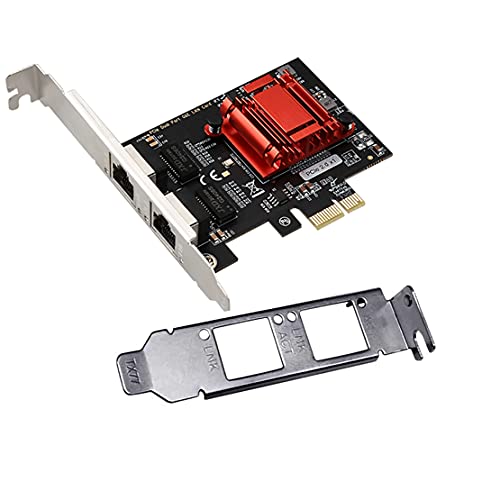
Looking for a reliable way to enhance your network performance? The Dual-Port PCIe Gigabit Network Card with Intel 82575/82576 is an excellent choice. It features a low-profile design and supports multiple operating systems, including Windows and Linux. With its dual ports, you can achieve speeds up to 1000M, ensuring stable connections for your tasks. It’s compatible with various PCI Express slots and includes advanced features like VLAN filtering and PXE boot. Users praise its easy installation and effective performance. Just keep in mind that some have reported hardware issues after a month. Overall, it’s an affordable option for boosting your network.
Best For: Users seeking an affordable network card that provides reliable dual-port connectivity for various operating systems.
Pros:
- Easy installation and compatibility with multiple operating systems, including Windows and Linux.
- Achieves high speeds up to 1000M for stable network performance.
- Advanced features such as VLAN filtering and PXE boot enhance functionality.
Cons:
- Some users have reported hardware failures after a month of use.
- Limited compatibility with VMware ESXi 7.0 or above.
- May require additional configuration for optimal performance in certain setups.
PCIe Ethernet Card Nic 10/100/1000Mbps Gigabit Network Card
![[Upgrade] PCIe Ethernet Card Nic 10/100/1000Mbps Gigabit PCI-Express Network Card (WIN10/11 Driver-Free) RJ45 Network LAN Card Wake On LAN Adapter Internal Computer Desktop PC for Win/Linux/Mac 1 PCS](https://m.media-amazon.com/images/I/41Pg9xidVZL._SL500_.jpg)
The PCIe Ethernet Card NIC 10/100/1000Mbps Gigabit Network Card stands out as an ideal choice for gamers and streamers seeking high-speed internet connectivity. It supports speeds up to 1000Mbps, ensuring smooth gameplay and streaming. Compatible with multiple systems, including Windows and Linux, installation is a breeze with its plug-and-play functionality. You’ll appreciate features like Wake-on-LAN and power-saving modes, enhancing your network experience. With positive ratings for reliability and no packet loss, this card serves as an effective replacement for failing onboard NICs. Plus, it includes handy accessories like a Cat6 Ethernet cable for immediate use.
Best For: Gamers and streamers seeking reliable high-speed internet connectivity for optimal performance.
Pros:
- Easy installation with plug-and-play functionality and included accessories.
- Supports high data rates up to 1000Mbps, ensuring smooth gameplay and streaming experiences.
- Compatibility across various systems, including Windows and Linux, with no driver required for Windows 10/11.
Cons:
- Limited support for PCI slots, requiring a PCIe slot for installation.
- Older systems may require driver downloads, which could be inconvenient for some users.
- Performance may depend on external factors, such as router capability and quality of Ethernet cables used.
BrosTrend 2.5Gb PCIe Network Card Adapter

If you’re a gamer or streamer seeking to enhance your online experience, the BrosTrend 2.5Gb PCIe Network Card Adapter is an ideal choice. This low-profile network card supports 2.5 Gbps speeds, giving you a significant boost over typical Gigabit adapters. Enjoy reduced latency and improved responsiveness, perfect for seamless gaming and streaming. Its durable metal shielding minimizes interference, ensuring stability and reliability. Plus, the plug-and-play installation for Windows 10 makes it easy to set up. With compatibility across various Windows versions and a limited lifetime warranty, you’ll feel confident in elevating your network performance with this adapter.
Best For: Gamers and streamers looking to enhance their online experience with faster speeds and reduced latency.
Pros:
- 2.5 Gbps speeds provide a significant performance boost over standard Gigabit adapters.
- Durable metal shielding minimizes electromagnetic interference for stable and reliable connections.
- Plug-and-play installation for Windows 10 makes setup quick and easy.
Cons:
- Driver installation required for systems other than Windows 10, which may be inconvenient for some users.
- Limited compatibility with non-Windows operating systems may restrict usage for some customers.
- Low-profile bracket may not fit all cases, potentially requiring additional modifications or purchases.
X-MEDIA PCI Gigabit Ethernet Network Card/Adapter
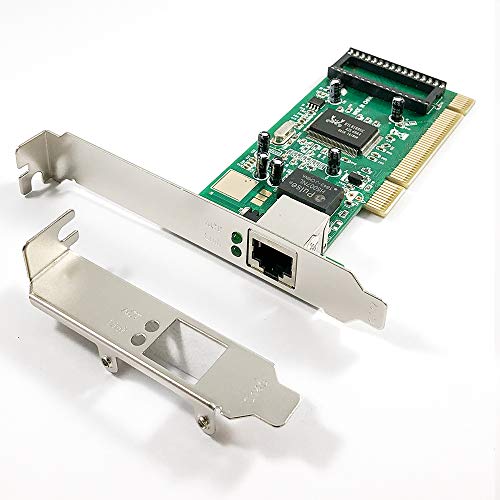
For budget-conscious users seeking a reliable network solution, the X-MEDIA XM-NA3500 PCI Gigabit Ethernet Network Card stands out with its impressive 10/100/1000Mbps data transfer rate. This card features the Realtek RTL8169SC chipset and supports various standards, ensuring compatibility with multiple operating systems, including Windows and Linux. Installation is generally straightforward; however, some users might need to manually install drivers for specific Windows versions. With an average rating of 4.4 stars, the card has proven reliable, though be aware of potential connectivity issues with DHCP servers. Overall, it’s a solid choice for enhancing your PC’s network capabilities.
Best For: Budget-conscious users looking for a reliable and high-speed network solution for their PC.
Pros:
- Easy installation and general compatibility with multiple operating systems.
- High data transfer rate of up to 1000Mbps for fast network performance.
- Low profile bracket included, making it suitable for compact PC cases.
Cons:
- Some users may encounter driver recognition issues, particularly on Windows 10.
- Potential connectivity issues with DHCP servers reported by certain users.
- Limited customer support responses for troubleshooting assistance.
2.5GBase-T PCIe Network Adapter RTL8125B Gigabit Ethernet Card
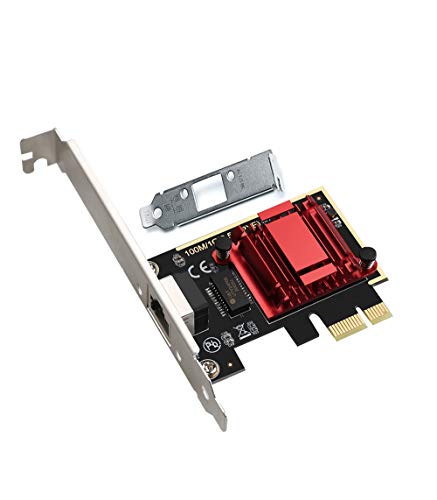
Looking to boost your home network or small business setup? The 2.5GBase-T PCIe Network Adapter RTL8125B is your answer. With speeds up to 2.5 Gbps, it greatly outperforms traditional 1 Gbps cards, enhancing file transfers, online gaming, and 4K streaming. Installation is a breeze—just plug it into your PCIe slot, and it’s often recognized automatically by Windows. Plus, its low-profile design guarantees compatibility with various motherboards. Users love its stability and efficient power management, earning it an impressive 4.5-star rating. Upgrade your connection today and experience faster, reliable networking!
Best For: Home users and small businesses looking to enhance their network speed and reliability with an affordable, easy-to-install Ethernet card.
Pros:
- Easy installation with plug-and-play setup, often recognized automatically by Windows.
- Supports high speeds of up to 2.5 Gbps, making it ideal for file transfers, gaming, and streaming.
- Low-profile design ensures compatibility with a variety of motherboards and cases.
Cons:
- Limited compatibility with ESXI 7.0.
- May require manual driver installation for some operating systems other than Windows.
- Return policy restrictions may apply for damaged items if misrepresented.
Realtek 1 Gbps PCIe Ethernet Network Interface Card Adapter

The Realtek 1 Gbps PCIe Ethernet Network Interface Card Adapter stands out for its plug-and-play compatibility with Windows, Mac, and Linux systems, making it an ideal choice for users who want a hassle-free wired connection. With a compact size of 4.72 x 0.79 x 3.74 inches and weighing just 0.317 ounces, it easily fits into various desktops. Installation is straightforward, requiring no drivers for most operating systems, and it includes both standard and low-profile brackets. Customers rate it 4.5 out of 5 stars, praising its easy setup and improved internet speed, though some noted minor connectivity issues.
Best For: Users seeking a reliable and easy-to-install Ethernet card for their desktop PCs or Macs without the need for additional software.
Pros:
- Easy plug-and-play installation with no drivers required for major operating systems.
- Compact design fits well in various desktop configurations, including low-profile setups.
- High customer satisfaction rating of 4.5 out of 5 stars, with positive feedback on improved internet speeds.
Cons:
- Some users reported issues with driver recognition and stability of physical connections.
- Not compatible with BSD operating systems, limiting its use for certain users.
- Potential for minor connectivity problems, as noted by a few customers.
Factors to Consider When Choosing PCI Express Ethernet Cards for PC
When you’re choosing a PCI Express Ethernet card for your PC, it’s essential to take into account several key factors. You’ll want to think about speed and performance metrics, compatibility with your operating system, and how easy the installation process is. Additionally, keep an eye on build quality and the features that suit your needs.
Speed and Performance Metrics
Speed and performance metrics play an essential role in selecting the right PCI Express Ethernet card for your PC. You’ll find options ranging from 10/100 Mbps for basic tasks to impressive 2.5 Gbps and 5 Gbps for high-performance needs, greatly enhancing your data transfer capabilities. Look for cards that support standards like IEEE 802.3 and features such as Jumbo Frame support to improve throughput. Full-duplex capabilities allow simultaneous data transmission and reception, effectively doubling your bandwidth. Additionally, technologies like Wake on LAN (WOL) and Quality of Service (QoS) can prioritize data packets, optimizing performance for gaming and streaming. In real-world scenarios, modern PCIe Ethernet cards often deliver speeds exceeding 2 Gbps, especially in bandwidth-heavy environments.
Compatibility With Operating Systems
Choosing a PCI Express Ethernet card that matches your operating system is essential for ensuring ideal performance and functionality. Make sure the card you pick is compatible with your OS, whether it’s Windows 11, 10, 8.1, 8, 7, Linux, or even macOS. Check for specific driver requirements, as some cards need manual installation for non-Windows 10/11 systems. If you’re using Windows Server, confirm that the card supports your version, like Windows Server 2022, 2019, or 2016. Also, review the supported PCIe slot types—x1, x4, x8, or x16—to guarantee a proper physical fit in your motherboard. Finally, look at user feedback for insights on installation experiences across different operating systems.
Installation Ease and Process
Although many PCI Express Ethernet cards offer straightforward installation, it’s important to understand the process to guarantee a smooth setup. Most models feature plug-and-play functionality, meaning your operating system, like Windows 10 or 11, will often recognize the card automatically without needing extra drivers. You’ll find that installing the card typically takes just a few minutes: simply insert it into the correct PCIe slot and secure it. Additionally, many cards come with both low-profile and full-height brackets, accommodating different PC case sizes. Users with varying levels of technical expertise frequently report that installation is manageable, and manufacturers usually provide detailed instructions and driver support to help you through the process effectively.
Build Quality and Durability
When you’re selecting a PCI Express Ethernet card, the build quality and durability should be at the forefront of your decision-making process. A sturdy design guarantees longevity and stable performance, with many cards featuring metal shielding to reduce electromagnetic interference. High-quality components, including advanced chipsets and integrated heat sinks, help dissipate heat efficiently, preventing overheating during demanding tasks. Look for cards that support features like Wake on LAN and PXE boot, as these require reliable hardware for effective operation. Additionally, low-profile brackets allow installation in compact systems without sacrificing structural integrity. Customer feedback often praises well-constructed Ethernet cards for their improved stability and performance in high-demand applications, making build quality a key factor in your choice.
Features and Functionality
Selecting the right features and functionality in a PCI Express Ethernet card can considerably enhance your PC’s networking performance. Start by considering the maximum data transfer speed; options range from standard Gigabit (1 Gbps) to faster 2.5 Gbps or even 5 Gbps. Confirm compatibility with your operating system, as many cards support various versions of Windows, Linux, and macOS. Evaluate the installation process, opting for plug-and-play cards for easy setup, while others may need driver installation. Look for additional features like Wake on LAN (WOL) and Quality of Service (QoS) to prioritize network traffic for gaming or streaming. Finally, consider the card’s physical design, including standard and low-profile brackets, for ideal fit and airflow in your PC case.
Price and Value Comparison
Finding the right PCI Express Ethernet card involves balancing price and value to meet your networking needs. As you compare options, consider speed capabilities; basic Gigabit cards can cost under $30, while faster 2.5 Gbps and 5 Gbps models range from $30 to over $100. Think about what you really need. Average customer ratings often fall between 4.5 to 4.7 stars, indicating strong user satisfaction, which can guide your choice. Installation ease is another factor; plug-and-play cards save you time and hassle, enhancing overall value. By weighing these elements, you’ll find the card that best fits your budget and performance requirements, ensuring you get the most out of your investment in network capabilities.
Warranty and Technical Support
As you weigh your options for PCI Express Ethernet cards, don’t overlook the importance of warranty and technical support. A robust warranty period, typically around two years, can indicate the card’s reliability and quality. It’s crucial to evaluate the availability of technical support; having 24/7 assistance can be invaluable for troubleshooting any issues that arise. Some manufacturers even offer lifetime technical support, providing peace of mind for long-term use. Customer feedback often emphasizes the need for prompt and responsive support, especially for installation and performance queries. Overall, a strong warranty and reliable technical support greatly enhance the value of your Ethernet card, reassuring you against potential defects and operational challenges.