A Mac Studio stand can lift the computer off your desk, give its underside intake more clearance, and help keep dust and clutter in check. The right choice depends less on cooling claims than on fit, stability, and whether you want a filter to maintain.
We’ve selected 10 stands spanning aluminum and acrylic designs, including options with removable filters. Here’s what to check before choosing one for your Mac Studio.
Best 10 Mac Studio Cooling Stands Picks for 2026
Easy-Clean Filter Pick
Spigen Clear Mac Studio Filter Stand

- Detachable, washable PVC filter
- Clear acrylic design
- Non-slip silicone padding
Best For: Mac Studio owners seeking washable dust protection
Minimalist Aluminum Pick

- CNC-machined aluminum alloy
- Elevated for underside airflow
- Silicone and anti-skid pads
Best For: An elevated aluminum Mac Studio setup
Low-Profile Filter Pick
HEWYIOS Acrylic Mac Studio Stand

- 0.55-inch-tall acrylic stand
- Detachable, washable filter
- Four filters and anti-slip pads
Best For: A low-profile Mac Studio stand with removable filters
Multi-Device Aluminum Pick

- Elevated aluminum construction
- Protective anti-slip silicone
- Check conflicting Mac mini fit details
Best For: Mac Studio or compatible Mac mini users wanting an aluminum stand
Low-Profile Pick
CaSZLUTION Clear Acrylic Base Stand

- Raises the device about 0.4 inch
- Four anti-slip rubber pads
- No assembly required
Best For: A minimal, low-profile desktop setup
Aluminum Pick

- Elevated aluminum design
- Silicone grip pads
- Matte, anodized finish
Best For: A silver stand for a Mac Studio setup
Monitor-Riser Pick
CaSZLUTION Clear Acrylic Stand

- 4.53-inch-tall acrylic riser
- Supports monitors up to 30 lb within stated base limits
- Guardrail, rubber pads, and side handles
Best For: Combining a compact monitor riser with device space
Best Washable Filter
Lonelyfox Mac Studio Mesh Stand

- Removable, washable dust filter
- Open-grid design promotes airflow
- Anti-slip support with space underneath
Best For: Mac Studio owners who prefer a washable filter
Best Cross-Device Fit

- Fits listed Mac Studios and 2020–2023 Mac minis
- Includes two spare filter sponges
- Anti-slip silicone corners
Best For: Compatible Mac Studio and older Mac mini owners
Best Upright Holder
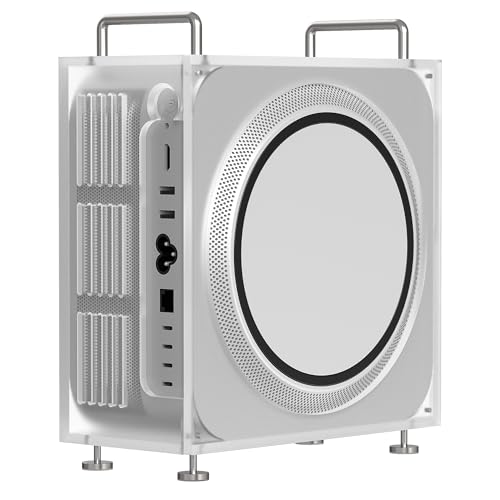
- Holds a compatible Mac Studio upright
- Magnetic opening and closing design
- Non-slip mats and power-button opening
Best For: Mac Studio owners seeking an upright desktop layout
Easy-Clean Filter Pick – Spigen Clear Mac Studio Filter Stand
Among mac studio cooling stands, this Spigen option focuses on keeping dust away from the Mac Studio’s air intake. Its clear acrylic stand has a built-in PVC filter that detaches for rinsing, plus silicone padding to help hold the computer in place.
Best For: Mac Studio owners who want a washable dust filter without hiding the device’s finish.
Pros:
- Detachable PVC filter can be rinsed with water.
- Transparent design keeps the Mac Studio visible.
- Rubberized silicone padding provides a non-slip grip.
Cons:
- Made only for the listed Mac Studio models.
- The filter adds a cleaning task as dust collects.
Choose this stand if dust management matters more to you than added desk storage. Check your exact Mac Studio model against the compatibility list before ordering.
Minimalist Aluminum Pick – SNANSHI Mac Studio Stand
If you prefer aluminum mac studio cooling stands, this SNANSHI model elevates the computer to leave room for airflow underneath. Its silver, Mac Studio-sized construction also creates some usable space below the device while keeping the desktop tidy.
Best For: Mac Studio users who want an aluminum stand with an elevated, space-saving layout.
Pros:
- CNC-machined aluminum alloy with a silver finish.
- Elevated design provides clearance beneath the Mac Studio.
- Silicone contact pads and an anti-skid base help prevent scratches and sliding.
Cons:
- Designed only for Mac Studio.
- No dust filter is listed.
This is the straightforward choice when you want clearance and a coordinated metal look, rather than a filtered stand. Its cooling benefit comes from the elevated design, not active cooling hardware.
Low-Profile Filter Pick – HEWYIOS Acrylic Mac Studio Stand
This HEWYIOS option suits shoppers comparing mac studio cooling stands with a low-profile, clear design. The acrylic bracket measures 0.55 inches tall and includes a detachable, washable filter; the listing also specifies four filters and four anti-slip pads.
Best For: Mac Studio owners who want a compact acrylic stand with removable dust filters.
Pros:
- Detachable filter can be cleaned with water.
- Includes four filters and four anti-slip pads.
- Transparent, hand-polished acrylic keeps the setup visually understated.
Cons:
- Compatible only with Mac Studio.
- Its low profile offers less elevation than taller stands.
Pick this one for a subtle lift and a filter you can remove for cleaning. If you need substantial space beneath your computer, its 0.55-inch height may be too modest.
Multi-Device Aluminum Pick – IFCASE Desktop Stand
The IFCASE stand is worth considering among mac studio cooling stands if you also use a compatible Mac mini. Its aluminum construction elevates the device for airflow and desk clearance, while silicone pads help keep it from slipping or scratching the surface.
Best For: Shoppers seeking one aluminum stand for a Mac Studio or a listed Mac mini model.
Pros:
- Elevated design leaves space underneath for airflow and desk organization.
- Aluminum construction with protective silicone pads.
- Listing names Mac Studio and Mac mini M2/M1 compatibility.
Cons:
- No removable dust filter is listed.
- Compatibility details differ within the listing, so confirm your exact device before buying.
Its appeal is the combination of a metal finish, simple setup, and support for more than one Apple desktop line. Because the supplied compatibility fields conflict on Mac mini generations, verify the fit for your model.
Low-Profile Pick – CaSZLUTION Clear Acrylic Base Stand
If you want a minimal option among mac studio cooling stands, this clear acrylic base raises your computer about 0.4 inch to leave space underneath for airflow. It requires no assembly and also fits the listed Mac mini models.
Best For: A low-profile desktop setup that keeps the Mac Studio close to the desk.
Pros:
- Approximately 0.4-inch lift creates clearance beneath the computer.
- Four bottom rubber pads help keep the stand in place.
- Clear acrylic design needs no assembly.
Cons:
- The modest lift offers less under-device clearance than a taller riser.
- No additional storage or monitor-riser function is listed.
Choose this one for a simple lift rather than a major change to your desk layout. Its low height and transparent finish keep the setup understated.
For shoppers comparing mac studio cooling stands with a metal finish, the IFCASE stand pairs an elevated design with matte, anodized aluminum. Its silicone pads are intended to steady the Mac Studio and protect the desk surface.
Best For: A silver, aluminum stand that complements a modern Mac Studio setup.
Pros:
- Elevated design provides space for airflow beneath the device.
- Aluminum construction has a matte, anodized finish.
- Silicone pads help resist slipping and desk scratches.
- Designed for straightforward setup without complicated tools.
Cons:
- Designed for Mac Studio; Mac mini compatibility is not listed.
- At a listed 2.5 pounds, it is heavier than the clear acrylic base stand in this roundup.
This is the material-focused choice if you prefer aluminum over acrylic. The supplied details describe improved airflow, but do not provide a measured temperature change.
Among mac studio cooling stands, this clear acrylic model offers a different layout: it raises a monitor while leaving room for a Mac Studio or compatible Mac mini underneath. The listed dimensions are 8.85 by 7.87 by 4.53 inches, so measure your setup before buying.
Best For: A desk that needs both a device space and a compact monitor riser.
Pros:
- Can support a monitor weighing up to 30 pounds when its base fits within the stated size limits.
- Open space around the computer allows room for heat dissipation.
- Back guardrail and bottom rubber pads help limit slipping.
- Side holes serve as handles for moving the stand.
Cons:
- Monitor bases must be no wider than 8 inches and no deeper than 7 inches.
- Its 4.53-inch height takes up more vertical room than a low-profile base.
This stand makes the most sense when you can use the space above the computer. Check both your monitor-base dimensions and available desk clearance to confirm it fits.
Best Washable Filter – Lonelyfox Mac Studio Mesh Stand
Among mac studio cooling stands, the Lonelyfox is a practical pick if you want an elevated, open-grid base with a dust filter you can remove and wash. Its gray mesh design is made for M-series Mac Studio models.
Best For: Mac Studio owners who want a washable filter and a little space beneath their computer for cables or small accessories.
Pros:
- Removable dust filter can be washed and reinstalled.
- Open-grid base promotes airflow around the elevated Mac Studio.
- Anti-slip contact points help keep the computer in place.
Cons:
- PLA construction may not suit buyers seeking a metal stand.
- No front power-button feature is listed.
This is a straightforward stand for airflow and routine filter cleaning, rather than a stand with added controls or ports.
Best Cross-Device Fit – IFCASE Dust Filter Stand
If you are comparing mac studio cooling stands but also use an older Mac mini, the IFCASE fits a wider range of devices than a Studio-only stand. Its elevated design combines a dustproof sponge with a large ventilation area.
Best For: Owners of a compatible Mac Studio or 2020–2023 M1/M2 Mac mini who prioritize a replaceable dust filter.
Pros:
- Fits listed Mac Studio models and 2020–2023 M1, M2, and M2 Pro Mac minis.
- Includes two spare dustproof sponges.
- Anti-slip silicone corners help prevent sliding.
Cons:
- Not compatible with the Mac mini M4 or M4 Pro, or the other newer Mac mini models excluded in the listing.
- Filter sponges require periodic replacement; the maker suggests roughly every six months, depending on the environment.
Choose this for its device range and replaceable filtration, while checking your exact Mac mini model before ordering.
Best Upright Holder – GEEKRIA Frosted Acrylic Stand
The GEEKRIA takes a different approach to mac studio cooling stands: it holds a compatible Mac Studio upright in a frosted acrylic chassis holder to free up desk space. Its magnetic opening and closing design makes assembly and carrying easier.
Best For: Mac Studio owners who prefer an upright desktop layout and want access to the power button through a dedicated opening.
Pros:
- Upright placement can free up desk space.
- Magnetic design opens and closes for assembly and transport.
- Non-slip mats add stability, and a panel opening provides power-button access.
Cons:
- Its 9.84-by-8.19-inch footprint and 3.82-inch height need room on the desk.
- No removable or replaceable filter is listed.
This holder makes the most sense if upright placement matters more to you than the filtered, under-device design of a conventional riser. Confirm your Mac Studio model against the listed compatibility before buying.
How We Picked These Mac Studio Cooling Stands
We focused on practical differences that matter at a desk: stated Mac Studio compatibility, clearance beneath the computer, whether the stand leaves the bottom air intake unobstructed, construction materials, and access for cleaning. We also included filtered and unfiltered designs so you can weigh dust control against maintenance. A stand may improve airflow around a crowded desktop, but it cannot be assumed to lower operating temperatures; that depends on the setup and workload.
Quick Comparison: Which Style Fits Your Setup?
Open aluminum stands suit buyers who want a sturdy-looking lift and straightforward access beneath the computer. Clear acrylic stands offer a less conspicuous look and may suit desks where matching silver metal is not the priority. Filtered stands are worth considering in dustier rooms, provided the filter is easy to remove and clean. A mesh-style design offers another look, but check how its base aligns with the Mac Studio’s intake before buying.
Several listed stands also advertise Mac mini compatibility. Treat that as a separate fit claim, not proof that every Mac Studio generation sits equally well on the same base.
Key Buying Factors for Mac Studio Cooling Stands
Confirm the Exact Fit
Check the seller’s compatibility list against your Mac Studio model, especially when a listing names particular Max or Ultra generations. Compare the stand’s platform dimensions and any raised edges with the computer’s footprint. If you use a sleeve or frequently move the computer, make sure the stand will not make lifting it awkward.
Keep the Air Path Clear
The Mac Studio draws air through its underside and exhausts it at the rear. Look for a design that raises the computer without covering the intake and leaves room behind the unit for warm air to escape. A stand is not a substitute for clearing dust from the surrounding area or for keeping the computer out of an enclosed space.
Consider Filters, Stability, and Upkeep
A detachable filter can help catch some debris before it reaches the intake, but a dirty filter can restrict airflow. Check whether replacement filters are available and whether cleaning requires moving the computer. For any material, look for a stable base and contact surfaces that help prevent sliding or scratches. Also check the assembled height if your Mac Studio sits beneath a shelf.
Who Should Buy Which Mac Studio Cooling Stands?
Choose an open stand if you mainly need elevation and want minimal upkeep. Consider a filtered stand if dust is a recurring problem and you are willing to clean it regularly. Pick acrylic for a visually lighter setup or aluminum for a metal finish. If your workspace is already open, clean, and well ventilated, you may not need a cooling stand at all; desk organization alone may be the better reason to buy one.