If your Mac Studio desk looks like a tangle of chargers and adapters, you don’t have to live with it. You’ll find durable, stylish options—from wall-mounted hangers to compact winders and clear organizer boxes—that keep cables accessible without clutter. Pick solutions that match your workflow and cable types, and you’ll reclaim clean surfaces and faster setup times. Keep going to see the ten best picks and what makes each one stand out.
19-Slot Wall-Mount Cable Hanger and Organizer for Cord Management

If you run a busy studio or workshop and need to tame dozens of cords, the 19-slot wall-mount cable hanger is your best choice—its 5.5–9.5mm slots accept audio, video, computer, and guitar cables so you can neatly store many cable types in one place. You’ll mount heavy-gauge steel with an electrophoresis black finish that resists rust and lasts. Installation’s simple: find studs, screw it in with the included hardware, and arrange cables. Use heat-shrink tubing or tape to adapt for narrower wires. It holds many cords, reduces tangles, and comes with a solid warranty and high customer ratings.
Best For: Those who run busy workshops, studios, or home AV setups and need a durable, wall-mounted solution to organize multiple audio, video, computer, or instrument cables.
Pros:
- Heavy-gauge steel with electrophoresis black finish resists rust and provides professional durability.
- Nineteen slots (5.5–9.5mm) accommodate a wide range of cable types and reduce tangling and clutter.
- Simple wall installation with included screws and ability to adapt slots for narrower wires using heat-shrink or tape.
Cons:
- Slot width may be too large for very thin cables without additional modification.
- Requires mounting to wall studs for secure installation, which may limit placement options.
- Fixed slot spacing and orientation may not suit every cable length or storage preference.
Fuse Reel The Side Kick Collapsible Charger Organizer and Travel Accessory (USB-C)
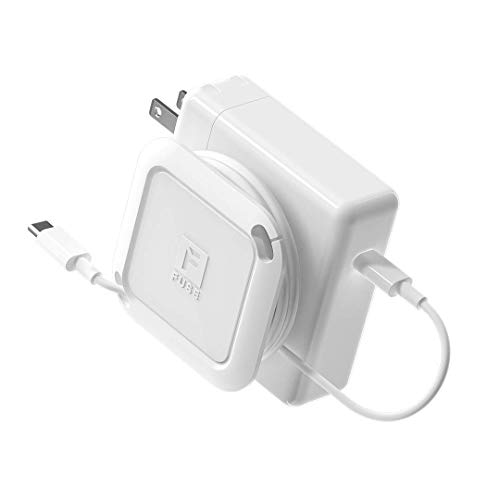
Travelers who need fast, reliable cable management will find the Fuse Reel Side Kick a perfect fit — its collapsible design lets you wind a MacBook USB‑C charging cable in under five seconds and tucks neatly into any electronics bag. You’ll keep chargers and cables organized without fuss: it manages USB‑C and MagSafe ends, fits Apple 60W–140W chargers and many PC bricks, and packs down for slim storage. It’s aimed at frequent laptop travelers who want quick, durable cable control. Note the size limit — avoid chargers smaller than 2.5 x 2.5 in (65 x 65 mm) for best performance.
Best For: Frequent laptop travelers who want a fast, compact way to keep USB-C and MagSafe chargers and cables neatly organized in an electronics bag.
Pros:
- Collapsible design winds a MacBook USB-C cable in under five seconds for quick packing and unpacking.
- Compatible with a wide range of Apple chargers (60W–140W) and many PC bricks, offering versatile use.
- Keeps cables and chargers tidy and slim for efficient storage in travel bags.
Cons:
- Not recommended for very small charging bricks smaller than 2.5 x 2.5 in (65 x 65 mm), limiting use with some tiny chargers.
- May not accommodate unusually shaped or proprietary charger bricks despite broad compatibility.
- Adds a small accessory to carry—may be unnecessary for users who prefer minimal gear or already use integrated cable management.
HumanCentric Cord Winder for MacBook Chargers (Medium)
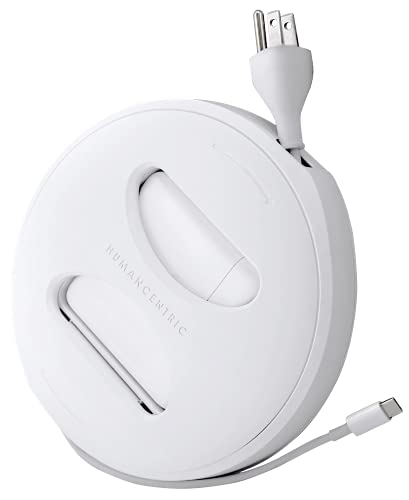
For anyone who wants quick, tangle-free setup on the go, the HumanCentric Medium cord winder is built for 45W–70W MagSafe chargers and their original Apple cables. You’ll declutter and speed setup by winding Apple USB-C or MagSafe cords neatly for travel, school, or business. It fits in bags, lets you extend only the length you need, and avoids tangled messes when you’re ready to work. Note it doesn’t include the charger or extension cord—those must be bought separately—and you should pick the correct size to match your charger. Don’t use non‑Apple cables to guarantee proper fit.
Best For: Anyone using a 45W–70W MagSafe MacBook charger who wants a compact, tangle-free cable solution for travel, school, or business.
Pros:
- Keeps original Apple USB-C or MagSafe cables neatly wound for faster setup and storage.
- Portable, fits easily in bags and backpacks and lets you extend only the length you need.
- Specifically sized for 45W–70W chargers to provide a reliable, snug fit when using Apple cables.
Cons:
- Does not include the charger or extension cord—those must be purchased separately.
- Only compatible with original Apple cables; non‑Apple cables may not fit properly.
- Requires selecting the correct size (Medium) for 45W–70W chargers, so wrong size purchases reduce effectiveness.
Fuse Reel Side Winder MacBook Charger Organizer Compatible with USB-C and MagSafe Apple Adapter
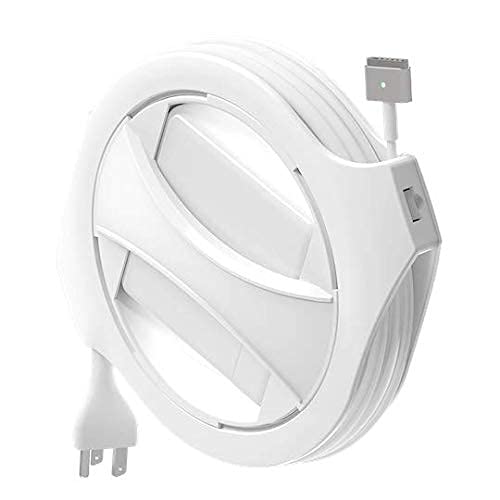
You’ll appreciate the Fuse Reel Side Winder if you want a tidy, adjustable solution for full-size MacBook chargers: it’s built to fit 60–96W USB‑C and MagSafe adapters, lets you set cable length from about 1 foot up to the charger’s full cord, and includes inserts and a right‑angle USB‑C adapter so you can quickly customize fit and routing. You get one Side Winder reel, four 60/61W inserts, a right‑angle USB‑C adapter, and instructions. It doesn’t include a charger or extension cable—use a thick three‑prong extension to replace fold‑out plugs. Check the sizing guide and adapter wattage before buying.
Best For: MacBook users with 60–96W USB-C or MagSafe power adapters who want a compact, adjustable way to tidy and shorten their charger cable for home, office, or travel.
Pros:
- Compatible with full-size 60–96W MacBook chargers and includes inserts plus a right-angle USB‑C adapter for a tailored fit.
- Lets you set cable length from about 1 foot up to the full charger cord for flexible organization.
- Small, dedicated reel design keeps bulky charger cables neat and reduces tangling.
Cons:
- Does not include the actual charger or the required thick three-prong extension cable (fold-out plug must be replaced).
- Not compatible with lower‑wattage Apple chargers (29–45W, 70W, 140W) or iPhone/iPad chargers, so requires checking wattage first.
- Only four 60/61W inserts provided—may need different inserts or adjustments for some charger shapes or future charger variations.
N NOROCME 192 PCS Cable Management Kit (Wire Organizer Sleeve, Cable Holders, Cord Clips, Organizer Straps, Fastening Cable Ties)
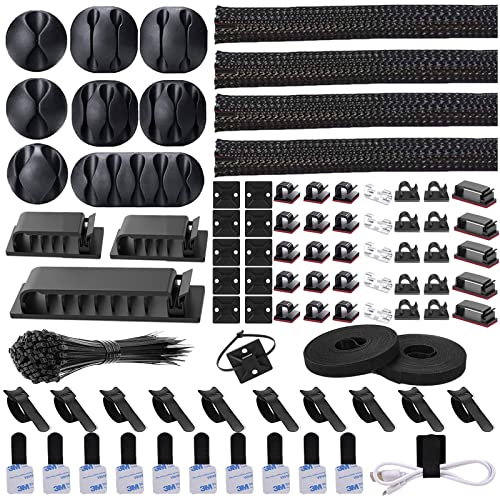
If you need a complete, budget-friendly kit to tame a cluttered Mac Studio setup, the N NOROCME 192-piece bundle is a smart pick — it packs sleeves, clips, holders, straps, and 100 fastening ties so you can organize desk, wall, and baseboard cables without buying extras. You get four 20-inch braided sleeves, 100 fastening ties, 20 reusable wire ties, two 118-inch adhesive tie rolls, 35 clips, 11 holders, and 20 zip-tie mounts in black or clear. Made from strong, eco-friendly Polyamide66, components resist pet chewing and last. Installation is tool-free; the split sleeve makes loading quick.
Best For: Individuals seeking an affordable, all-in-one cable management solution to organize desk, wall, and baseboard cables for setups like a Mac Studio or home office.
Pros:
- Includes a comprehensive assortment (sleeves, 100 fastening ties, reusable ties, adhesive tie rolls, clips, holders, and mounts) so you likely won’t need extra parts.
- Tool-free installation with split braided sleeves and adhesive options makes setup quick and easy.
- Made from strong, eco-friendly Polyamide66, durable and resistant to pet chewing.
Cons:
- Sleeves are limited to four 20-inch lengths, which may be short for larger or more complex setups.
- Adhesive mounts and clips may not adhere well on dirty, textured, or oily surfaces.
- No color variety beyond black and clear for users wanting different aesthetics.
HumanCentric Cord Winder and Travel Charger Organizer for MacBook (USB-C MacBook Chargers)
Busy travelers and students will love the HumanCentric Cord Winder because it tucks your USB‑C MacBook charger into a compact reel that prevents tangles and speeds setup. You’ll pick the right size—S fits 29W/30W USB‑C—so your MacBook Pro or Air charger sits snug. It doubles as a travel case, letting you extend just the cord you need and rewind quickly when you’re done. It’s compact for bags and ideal for school, business trips, and commuting. Note it works with original Apple USB‑C and MagSafe cables but doesn’t include the charger or extension; buy the correct size separately.
Best For: Busy travelers, students, and commuters who want a compact, tangle-free way to store and quickly deploy their USB‑C MacBook chargers.
Pros:
- Keeps USB‑C and MagSafe MacBook chargers neatly wound to prevent tangles and speed setup.
- Compact travel-friendly design fits easily in bags and backpacks.
- Multiple sizes (S, M, L, XL) ensure a snug fit for a wide range of charger wattages.
Cons:
- Does not include the MacBook charger or extension cable — those must be purchased separately.
- Must choose the correct size for your charger model or it may not fit properly.
- Designed for original Apple cables; fit or compatibility with third‑party cables may vary.
elago Charger Cable Management Case (Cord Reel Organizer) for MacBook Pro

For MacBook Pro users who value neat desks and longer-lasting chargers, the elago Charger Cable Management Case is a compact solution that keeps your power cable wound, protected, and adjustable to the exact length you need. You’ll get a silicone cord reel that fits recent 14″ and several 16″/15″ MacBook Pro models, designed in-house for a precise, modern look. It screws in for secure placement, shields cables from dirt, oil, scratches, and drops, and lets you set exposed length easily. With a 4.4-star average and Amazon’s return policy, it’s a practical, stylish pick to tame charging clutter.
Best For: MacBook Pro users who want a tidy desk and protected, adjustable charging cables for 14″ and select 15″/16″ models.
Pros:
- Compact silicone cord reel that protects cables from dirt, oil, scratches, and drops.
- Adjustable exposed cable length lets you customize reach and reduce wear.
- In-house design with screw-in installation for a secure, precise fit and modern aesthetic.
Cons:
- Screwed installation may be less convenient for users who prefer tool-free attachment.
- Compatible only with specific MacBook Pro models, so not universal.
- Adds a small accessory to carry or install, which might not suit minimalists.
VELCRO Brand Cord Organizer 2 Pack (5-Slot Adhesive Cable Holder)

Gamers, students, and anyone who juggles multiple chargers will appreciate the VELCRO Brand Cord Organizer’s five-slot design and adhesive backing, which keeps frequently used cords visible and within reach while preventing them from slipping off your desk or nightstand. You get two 7.25-inch nylon/polypropylene holders with dual-function slots plus a sleeve for longer wires. Stick them to desks, walls, or other smooth surfaces to secure charger cables and stop drops. They reduce clutter, protect cords, and tidy gaming or workstations. With a 4.3-star rating and compact packaging, they’re a practical, giftable solution for everyday cable management.
Best For: Gamers, students, and anyone who uses multiple chargers and wants to keep cords visible, accessible, and from slipping off desks or nightstands.
Pros:
- Keeps frequently used charger cables organized and prevents them from falling off surfaces.
- Dual-function design with five slots plus a sleeve accommodates short chargers and longer wires.
- Strong adhesive backing sticks to desks, walls, and other smooth surfaces for easy mounting.
Cons:
- Adhesive may not stick well to textured or porous surfaces and can lose adhesion over time.
- Limited to five slots per holder; may not suffice for very cable-heavy setups.
- Made of nylon/polypropylene and comes in only one color (black), which may not match all décor.
HumanCentric Cord Winder for MacBook Chargers (USB-C & MagSafe)
If you travel with a MacBook and want a tidy, grab-and-go solution, the HumanCentric Cord Winder is a smart pick—it’s designed to fit 60W–67W USB-C and MagSafe chargers so you won’t fumble with tangled cords. You get a compact, round reel that stores Apple USB-C and MagSafe cables (charger not included), trims cord length, and fits easily in bags. Choose the correct size—Large for 60W–67W—or opt for S, M, or XL for other wattages. It weighs 10.8 oz, includes one USB port, and comes in white. Amazon’s 30-day return applies; check the product link for warranty.
Best For: Travelers, students, and professionals who use 60W–67W MacBook chargers and want a compact, grab-and-go solution to keep USB-C or MagSafe cables tidy.
Pros:
- Compact, round design that declutters and prevents tangled cables for faster setup.
- Specifically sized options (choose Large for 60W–67W) to securely fit common MacBook chargers.
- Lightweight and portable (10.8 oz), fits easily in bags and backpacks for travel.
Cons:
- Charger and extension cord not included—only the cable winder; must ensure you have compatible Apple cables.
- Limited to a single USB port and North American Type A plug orientation.
- Must select the correct size for your charger wattage or it may not fit securely.
FRETONBA Cable Charger Organizer Box with Adjustable Compartments (Clear)

You’ll appreciate the FRETONBA Cable Charger Organizer Box if you want a clear, stackable solution that keeps Mac Studio cables and chargers neatly separated; its transparent PET shell makes finding cords instant, and the stackable, large-capacity design saves desk and drawer space. Adjustable compartments let you size sections for chargers, USB-C leads, or earbuds, while included silicone wire ties keep bundles tidy. The boxes measure 10.43″ × 7.28″ × 4.72″, are waterproof, durable, and easy to clean. You get two boxes and 14 silicone ties, and you can also store office supplies, jewelry, or cosmetics.
Best For: users who need a clear, stackable storage solution to keep Mac Studio cables, chargers, and small accessories neatly organized and visible.
Pros:
- Transparent PET construction makes it easy to see and access cords and accessories at a glance.
- Stackable, large-capacity design with adjustable compartments and included silicone ties for customizable, tidy cable management.
- Waterproof, durable, and easy to clean—also versatile for office supplies, jewelry, or cosmetics.
Cons:
- Fixed outer dimensions (10.43″ × 7.28″ × 4.72″) may not fit very large power bricks or bulky adapters.
- PET material and clear design offer less impact protection compared with thicker, padded organizers.
- Only two boxes and 14 silicone ties included, which may be insufficient for users with extensive cable collections.
Factors to Consider When Choosing Mac Studio Cable Organizers
When picking a Mac Studio cable organizer, you’ll want to check compatibility with your chargers and assess how many cables and accessories you actually need it to hold. Think about mounting and placement options, material durability, and whether you need something portable for travel. Those factors will help you choose a solution that fits your workflow and space.
Compatibility With Chargers
Because chargers vary by wattage and connector type, check compatibility before buying a Mac Studio cable organizer so your charger fits securely and functions properly. You should confirm the organizer supports your specific MacBook charger wattage—60W, 61W, 67W, 85W, etc.—and that its design matches USB-C or MagSafe profiles. Inspect size and channel dimensions to verify the adapter body, plug, and cable thickness sit snugly without bending. Note whether the organizer accommodates any extensions you use; some models require separate extension cords, which affects fit and routing. Finally, read product specs and photos closely, and match them to your charger model to avoid returns or unsafe strain on connectors.
Cable Capacity Needs
How many cables do you actually need to tame around your Mac Studio? Count everything: power, Thunderbolt, USB, audio, and HDMI. Match that number to organizers with enough slots or expandable compartments so thicker power and audio cables fit without crowding. Choose adjustable slots or modular channels that adapt as your setup changes—dongles, dock cables, and thicker power leads need room. Prefer sturdier, heavier-gauge materials if you’ll bundle many cables; they won’t bend or sag under weight. Also think about visual impact: a sleek organizer that hides a dozen cords keeps your desk tidy and complements your Mac Studio. Finally, confirm the organizer’s capacity before buying so you don’t outgrow it quickly.
Mounting and Placement
If you’ll be mounting cable organizers, plan their placement around your outlets and workspace layout so cords reach without stretching or looping, and you can access plugs comfortably. Pick heights for wall-mounted organizers that won’t block equipment or furniture and that feel easy to use. Clean and check mounting surfaces so they’ll support the organizer plus the cables you’ll store; a weak surface invites failure. Map cable routes to minimize tangles, grouping power, data, and audio lines separately where possible. Measure available wall and work-surface space to avoid overcrowding; a too-large unit can create clutter as easily as too-small one. Ultimately, place organizers to balance accessibility, clean routing, and unobstructed studio flow.
Material Durability
Durability matters when you’re choosing a cable organizer for your Mac Studio because it determines how well the unit will protect cables and hold up under daily use. Choose heavy gauge steel or premium silicone for ruggedness; both resist crushing and everyday abrasion. Prefer rust- and corrosion-resistant finishes so the organizer keeps looking and performing like new. If you want a greener option, nontoxic Polyamide66 offers surprising strength and longevity. Waterproof and easy-to-clean surfaces add real-world practicality, letting you wipe spills and dust without degrading materials. Finally, check construction: organizers should let you load and unload cables smoothly without forcing parts or bending clips, which prevents premature failure. Prioritize these material traits for lasting, reliable cable management.
Portability and Travel
When you travel with a Mac Studio, portability should guide your choice of cable organizer: pick a compact, lightweight design that fits in your bag without adding bulk, lets you wind and unwind cables quickly, and adapts to different cable types and lengths with adjustable compartments or customizable features. You’ll want something slim that tucks into backpacks or briefcases and uses lightweight materials so it won’t weigh down your gear. Fast winding and unwinding save time at hotels or client sites, so choose organizers with easy-access loops, reels, or magnetic closures. Multi-compartment options that handle USB-C, power, HDMI, and audio cables give you flexibility. Adjustable dividers or modular inserts let you tailor storage for varying cable lengths and reduce tangles while traveling.