If you need a dependable wired connection for a MacBook, these USB‑C hubs give you fast Ethernet plus extra ports for video, storage, and power. You’ll find models that handle 4K@60Hz, 100W pass‑through charging, and multi‑gigabit transfers without adding bulk. Pick the right mix of ports and power delivery and your MacBook will behave like a full workstation — keep going to see which hubs match your workflow.
Anker 8-in-1 USB-C Hub with Ethernet, 4K HDMI, 85W PD, 10Gbps USB-C, USB-A Ports, microSD/SD Card Reader

If you need a single, reliable adapter that turns one USB‑C port into a full desktop workstation, the Anker 8‑in‑1 is a great choice — especially for MacBook users who want wired Ethernet, 4K HDMI output, fast data transfers and high‑wattage pass‑through charging without juggling multiple dongles. You get 4K@60Hz via DP1.4 laptops (4K@30Hz on DP1.2), a dedicated HDMI for video, 85W PD pass‑through (use a 100W charger for best results), a 10Gbps USB‑C plus two 10Gbps USB‑A ports, gigabit Ethernet, and microSD/SD slots. It’s compatible with macOS 12+, Windows, ChromeOS; not Linux.
Best For: MacBook and other USB-C laptop users who want a single, reliable multiport adapter for wired Ethernet, 4K HDMI output, fast data transfers, and high-wattage pass-through charging at a desktop setup.
Pros:
- 4K@60Hz HDMI output with DP1.4 devices (4K@30Hz on DP1.2) for crisp external displays.
- 85W pass-through charging (recommend 100W charger) plus 10Gbps USB-C and USB-A ports for high-speed data.
- Built-in gigabit Ethernet and microSD/SD card reader provide full desktop connectivity from one USB-C port.
Cons:
- HDMI port is video-only; the USB-C port on the hub is for data, not additional display output.
- Not compatible with Linux (supports macOS 12+, Windows 10/11, ChromeOS only).
- Requires a powered charger (minimum ~15W to operate; use recommended 100W for full charging) which adds to overall setup needs.
UGREEN Revodok 6-in-1 USB-C Hub with Gigabit Ethernet, 4K HDMI, 100W PD, and USB-A Ports

The UGREEN Revodok 6-in-1 is ideal for remote workers and travelers who need reliable wired networking and plenty of ports in a compact package: it combines a Gigabit RJ45 port for stable 1000Mbps connections, a 4K@30Hz HDMI output, three USB-A 3.0 ports, and 85W pass-through PD charging (from its 100W PD capacity) so you can power a MacBook while running multiple peripherals. You’ll get up to 5Gbps USB transfers for external drives, broad device compatibility including Mac M-series and iPhone 16 Pro, and a lightweight 140g plastic enclosure. Warranty covers 24 months with a 30-day Amazon return.
Best For: Remote workers and travelers who need a compact hub that provides wired Gigabit networking, multiple USB-A ports, 4K HDMI output, and high‑power pass‑through charging for laptops like MacBooks.
Pros:
- Provides stable Gigabit Ethernet (up to 1000Mbps) for reliable wired connections.
- 85W pass-through PD charging (from a 100W PD capacity) lets you power most laptops while using peripherals.
- Three USB-A 3.0 ports and up to 5Gbps data transfer support high-speed connectivity for external drives and accessories.
Cons:
- HDMI limited to 4K@30Hz (no HDR/3D), so not ideal for high-refresh or HDR displays.
- Enclosure is plastic and relatively lightweight (140 g), which may feel less premium or durable to some users.
- PD pass-through reserves 15W for hub operations, reducing maximum charging available to certain high-power devices.
Anker 6-in-1 USB-C Hub with Ethernet and 4K HDMI Multiport Adapter

For anyone who needs a compact, all-in-one connector for travel or a crowded desk, the Anker 6-in-1 USB-C Hub is a smart choice — especially if you rely on wired Ethernet and an external 4K display. You’ll get HDMI (up to 4K@30Hz), a Gigabit Ethernet port, a USB-C data port, and two USB-A ports in a slim PowerExpand adapter. Plug a 65W PD charger into the hub’s PD input to keep charging while you work. It’s compatible with MacBook Air, iPad Pro, XPS, and more, comes with an 18-month warranty, and backed by Anker support.
Best For: travelers and remote workers who need a compact hub that adds Gigabit Ethernet, 4K HDMI output, and pass-through charging to USB-C laptops and tablets.
Pros:
- Slim, travel-friendly 6-in-1 design that adds HDMI (up to 4K@30Hz), Gigabit Ethernet, a USB-C data port, and two USB-A ports.
- Supports Power Delivery pass-through (connect a 65W charger) to keep laptops charged while using peripherals.
- Broad compatibility (MacBook Air, iPad Pro, XPS, and more) and backed by an 18-month warranty and Anker customer support.
Cons:
- HDMI limited to 4K@30Hz, not 60Hz, which may not suit high-refresh external displays or smooth motion.
- Relies on a single USB-C connection to the host, so performance can be affected by host bandwidth and device capabilities.
- No SD/microSD card reader included, which some users may expect in a multiport travel hub.
Hiearcool USB-C Hub 8-in-1 with HDMI 4K@60Hz, 1Gbps Ethernet, 100W PD, USB 3.0, SD/TF (Compatible with MacBook Pro/Air, Dell, Lenovo)

Need a reliable all-in-one dock? You’ll like the Hiearcool USB-C Hub 8-in-1. It gives 4K@60Hz HDMI for crisp external displays, a 1Gbps Ethernet port for stable, fast wired internet, and 100W pass-through PD so you can charge while using every port. Three USB-A 3.0 ports handle keyboards, mice, and drives, while SD and microSD slots speed media transfers for photo and video work. It’s compatible with MacBook Pro/Air, Dell, Lenovo, and other USB-C laptops, making it a compact, travel-ready option for remote work, classes, conferencing, and presentations.
Best For: professionals and students who need a compact, travel-ready USB-C dock to add 4K@60Hz display output, reliable wired networking, and multiple ports for peripherals and media transfer.
Pros:
- Provides 4K@60Hz HDMI and 1Gbps Ethernet for crisp displays and stable wired internet.
- 100W pass-through USB-C PD lets you charge your laptop while using all ports.
- Three USB-A 3.0 ports plus SD and microSD slots simplify connecting peripherals and transferring media.
Cons:
- Requires a host with USB-C Alt Mode and sufficient power delivery support for full functionality.
- Single HDMI output limits multi-monitor setups without additional adapters.
- Compact hubs can run warm under heavy use, potentially affecting sustained performance.
Acer 6-in-1 USB-C Hub with Ethernet, 4K@60Hz HDMI, 100W PD, USB-A/USB-C Ports (USB-C Splitter)

Gamers and remote workers who need stable wired networking and a crisp external display will appreciate the Acer 6-in-1 USB-C hub: it combines gigabit Ethernet with 4K@60Hz HDMI and up to 100W PD so you can charge, stream, and transfer files simultaneously. You get six ports from a single USB-C: 4K@60Hz HDMI (requires DP Alt Mode/HDMI 2.0+), gigabit RJ45 (10/100/1000Mbps), two USB-A 3.1 Gen1 ports, and a USB-C 3.1 Gen1 data port — all offering 5Gbps transfers. With up to 85W laptop output when paired with a 100W charger, it supports macOS, Windows, ChromeOS, and Linux.
Best For: Gamers and remote workers who need stable wired networking, a crisp 4K@60Hz external display, and simultaneous charging/data from a single USB-C port.
Pros:
- Provides gigabit Ethernet plus 4K@60Hz HDMI for reliable networking and high-quality external displays.
- Supports up to 100W PD (delivering up to ~85W to a laptop) while using other ports for uninterrupted workflows.
- Multiple high-speed ports (two USB-A 3.1 Gen1 and one USB-C 3.1 Gen1) with 5Gbps transfers for peripherals and storage.
Cons:
- 4K@60Hz requires host support for DP Alt Mode and HDMI 2.0+; older devices may be limited to lower resolutions.
- Requires a separate 100W charger (not included) to achieve maximum PD output.
- Limited to a single HDMI output and fewer ports than larger docking stations, which may not suit heavy multi-monitor or peripheral setups.
UGREEN Revodok Pro 9-in-1 USB-C Hub with Ethernet, 4K@60Hz HDMI, 100W PD, USB-A, SD/TF Card Reader (Compatible with Mac M1/M2/M3/M4/M5, Steam Deck)

If you rely on a stable wired connection and frequent high-resolution displays, the UGREEN Revodok Pro is a smart pick — it combines gigabit Ethernet with a 4K@60Hz HDMI output and multiple ports so you can dock a MacBook and keep peripherals, SD cards, and power connected at once. You get nine ports: RJ45 (1000Mbps), 4K@60Hz HDMI, SD/TF reader, USB-A and C data, plus an 85W pass-through PD (15W reserved for hub use). The USB-C power-only port won’t handle data or video, but the hub’s 10Gbps data lanes and Steam Deck compatibility make it versatile.
Best For: users who need a compact docking solution that provides stable wired networking, high-resolution external display support, and multiple ports for peripherals and SD cards—particularly MacBook and Steam Deck owners.
Pros:
- Gigabit Ethernet (1000Mbps) for reliable, low-latency wired network connections.
- 4K@60Hz HDMI plus multiple USB-A/C and SD/TF card slots for versatile connectivity and high-quality external displays.
- Up to 85W pass-through PD charging keeps laptops powered while using the hub (with 15W reserved for hub operation).
Cons:
- The USB-C power port is power-only and does not support data transfer or video output.
- Pass-through PD is limited to 85W (not full 100W), which may be insufficient for some high-power laptops under heavy load.
- Only one HDMI video output (no multi-monitor support beyond the single 4K@60Hz port).
USB C Hub Multiport Adapter (8-in-1)

For professionals who juggle video calls, external displays, and fast file transfers, the USB C Hub Multiport Adapter (8-in-1) is a compact all-in-one solution: it gives you 4K HDMI output, a 100W PD charging pass-through, a reliable RJ45 Ethernet jack, two USB-A ports, a USB-C data port, and SD/TF card readers so you can connect a laptop and peripherals without swapping dongles. You’ll get 4K@30Hz HDMI, two USB 3.0 ports at 5Gbps, plus USB-C/USB 2.0 at 480Mbps. The Ethernet delivers up to 100Mbps. Aluminum housing improves heat dissipation; it’s plug-and-play, cross-platform, and backed by a one-year warranty.
Best For: Professionals and power users who need a compact, all-in-one USB-C hub to connect external displays, wired Ethernet, multiple peripherals, and SD/TF cards while charging a laptop.
Pros:
- Expands a single USB-C port to 8 ports including 4K HDMI, 100W PD charging, RJ45 Ethernet, and SD/TF card readers for versatile connectivity.
- Two USB 3.0 ports offer fast data transfer up to 5Gbps and the aluminum housing provides durability and better heat dissipation.
- Plug-and-play cross-platform compatibility (MacOS, Windows, iPadOS, ChromeOS, Android) with a 1-year warranty and Amazon 30-day return option.
Cons:
- HDMI supports 4K only at 30Hz, which may not be sufficient for smooth high-frame-rate video or gaming.
- Ethernet limited to up to 100Mbps, slower than gigabit alternatives for heavy network tasks.
- USB-C PD port is charging-only (no data), so simultaneous high-speed data and pass-through charging depend on available device ports.
MOKiN 9-in-1 USB-C Hub Adapter (USB-C to HDMI, Ethernet, 3 USB Ports, SD/TF Card Reader, 100W PD)
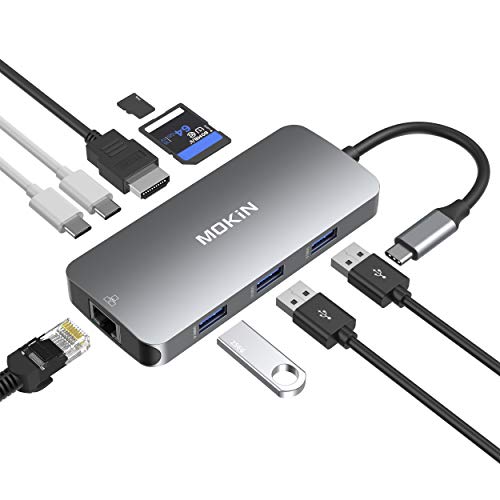
The MOKiN 9-in-1 hub is ideal if you need a single dongle that handles high-speed wired networking and power-hungry workflows — it gives you a Gigabit Ethernet port plus 100W USB-C Power Delivery so you can plug into a stable LAN and keep your MacBook charged while driving 4K video and multiple USB devices. You get three USB 3.0 ports (5Gbps), HDMI supporting 4K@30Hz, and SD/TF readers that can be used simultaneously. Its aluminum body is compact and light, fits MacBooks and many laptops or phones, and carries a solid 4.6-star user rating with warranty options.
Best For: Professionals and travelers who need a compact hub that provides Gigabit Ethernet, 100W charging, 4K video output, and multiple USB and card-reader ports for powering and connecting a MacBook or USB-C laptop on the go.
Pros:
- Compact aluminum design combines Gigabit Ethernet, 4K HDMI, 3x USB 3.0 (5Gbps) and dual SD/TF readers in one dongle.
- 100W USB-C Power Delivery lets you charge power-hungry laptops while using all other ports.
- Simultaneous access to multiple ports (including SD + microSD) and strong user ratings with warranty support.
Cons:
- HDMI limited to 4K at 30Hz, not 60Hz for smoother high-resolution video.
- Relies on a single USB-C host port — may block adjacent ports on some laptops without an extender.
- Some mobile devices may have limited compatibility for certain hub functions (e.g., video output).
MOKiN USB-C Multiport Adapter Hub for MacBook Pro/Air (4K HDMI, Gigabit Ethernet, 2 USB, TF/SD, 100W PD, Thunderbolt 3)

Photographers and power users who need fast media offloads and multiple display options will like the MOKiN USB-C Multiport Adapter. You get 8-in-2 connectivity: HDMI (4K@30Hz), Gigabit Ethernet (up to 1000 Mb/s), one USB 3.0 (5 Gbps), one USB 2.0, Thunderbolt 3 (40 Gbps, 5K, 100W PD), a secondary USB-C at USB2 speeds, and SD/TF card readers (up to 104 Mb/s usable simultaneously). It’s aluminum and ultra-slim, fits MacBook Pro/Air 2016–2019, but won’t work with protective cases. It supports external displays and fast wired networking, though it won’t power an Apple USB Super Drive.
Best For: Photographers, designers, and power users who need fast media offloads, multiple display options, and expanded ports for MacBook Pro/Air (2016–2019).
Pros:
- 8-in-2 connectivity with HDMI (4K@30Hz), Gigabit Ethernet, USB 3.0 (5 Gbps), Thunderbolt 3 (40 Gbps, 5K, 100W PD), additional USB-C, and SD/TF card readers.
- Fast wired networking and high-speed data transfers ideal for large media files and external drives.
- Slim aluminum design that matches MacBook aesthetics and supports simultaneous use of SD and TF cards.
Cons:
- Compatible only with MacBook Pro/Air 2016–2019 and may not fit if a protective case is used.
- Secondary USB-C port is limited to USB 2.0 speeds and not full Thunderbolt functionality.
- Does not support the Apple USB Super Drive.
Acer 9-in-1 USB-C Hub Docking Station (4K HDMI, Ethernet, USB-A 3.0, VGA, SD Card Reader, PD 100W)

If you need a single dongle that handles 4K video, Gigabit Ethernet, fast data transfers and 100W laptop charging, the Acer 9‑in‑1 USB‑C Hub is a solid pick. You get 4K@30Hz HDMI plus VGA for mirror or extended displays (requires DP Alt Mode), a Gigabit Ethernet port that hits 1Gbps with CAT6+, and three USB‑A 3.0 ports offering up to 5Gbps transfers. SD and TF slots accept cards up to 1TB. The USB‑C PD port supplies up to 100W charging (no data). It’s broadly compatible with MacBooks, Windows laptops, Surface, PS5, and major OSes.
Best For: Power users and professionals who need a single USB-C hub to provide 4K video output, Gigabit Ethernet, fast USB data, and up to 100W laptop charging for multi-monitor and docking setups.
Pros:
- Offers 4K@30Hz HDMI plus VGA for mirror or extend displays (requires USB-C DP Alt Mode), enabling flexible dual-display setups.
- Gigabit Ethernet (1Gbps with CAT6+) plus three USB-A 3.0 ports (up to 5Gbps) and SD/TF card slots (up to 1TB) for robust connectivity and fast data transfer.
- PD 100W pass-through charging supplies ample power for most laptops while keeping a compact, all-in-one dongle form factor.
Cons:
- HDMI limited to 4K@30Hz, which may disappoint users wanting 60Hz at 4K for smoother motion.
- USB-C port is charge-only (no data), reducing available upstream data ports compared with docks that include data-capable upstream.
- May require driver installation for network functionality on older Windows versions (Windows 7/XP), adding setup steps for legacy systems.
Factors to Consider When Choosing Macbook Usb C Hubs With Ethernet
When choosing a USB-C hub for your MacBook, check the port selection and layout so your peripherals fit without blocking each other. Make sure the ethernet supports the speed and stability you need, and confirm the hub’s power delivery can keep your MacBook charged under load. Also verify video output formats and data transfer rates to match your monitors and external drives.
Port Selection and Layout
Choosing the right USB-C hub means matching the ports and layout to how you work—count HDMI, USB-A, Ethernet, SD/microSD slots, and USB-C data or PD ports so every device you need will plug in without adapters. You’ll want USB-A and HDMI for legacy peripherals and external displays, plus card readers if you handle cameras. Favor hubs with USB 3.0 or higher for fast file moves (up to 5Gbps) and USB-C data ports that can reach 10Gbps when available. Check PD wattage—85W or 100W options keep your MacBook charged while other ports are active. Finally, inspect physical port placement: spaced and staggered connectors reduce crowding and interference, making multi-device setups effortless and reliable.
Ethernet Speed and Stability
Because a reliable wired connection removes the guesswork of Wi‑Fi, prioritize hubs with true Gigabit Ethernet ports so you get up to 1Gbps for video calls, streaming, and large downloads. Choose Gigabit over legacy Fast Ethernet (100Mbps) to avoid bottlenecks. Check hub specs for support of Cat6 or higher cables to guarantee the physical layer can handle throughput without degradation. Inspect reviews or tests for real‑world stability: low latency, minimal packet loss, and consistent throughput under sustained transfer matter more than peak numbers. A well‑engineered hub preserves link quality even when your MacBook is under load and multiple ports are active. That reliability translates to fewer dropped calls, smoother streams, and faster, predictable file transfers.
Power Delivery Capacity
Power-delivery capacity matters because it determines whether your MacBook will charge at full speed while the hub runs multiple peripherals; pick a hub that supplies equal or greater wattage than your Mac’s charger (often 60–100W) to avoid slow charging or battery drain during heavy use. You should verify your Mac’s power requirement and choose a hub with PD output that exceeds it — many hubs offer 65W–100W. A 100W hub is safest for demanding models and still leaves headroom for attached devices. Using a hub with insufficient PD can cause slow charging or net battery drain under load, hurting productivity. Also check whether the hub negotiates power dynamically and if any ports share or cap available wattage.
Video Output Capabilities
After you’ve confirmed a hub can supply enough power, check its video output capabilities so your external display looks and performs as expected. Look at the HDMI spec: many hubs handle 4K, but some top out at 30Hz while others deliver 60Hz; that affects smoothness for motion and scrolling. Note whether the hub uses DisplayPort 1.4 to achieve reliable 4K@60Hz or relies on an older HDMI version that limits refresh rate. Verify which ports actually carry video — an obvious HDMI port usually does, but some USB‑C sockets are data‑only and won’t drive a monitor. If you need multiple screens, consider hubs with dual‑display support for extend/mirror setups. Finally, confirm HDR and 3D compatibility if your workflow demands those features.
Data Transfer Performance
Data transfer speed is one of the first things you should check when picking a MacBook USB‑C hub with Ethernet, since it directly affects how fast you can move large files, back up drives, or run external SSDs. Look for hubs advertising 10Gbps if you need top-tier throughput; 5Gbps is common and fine for many tasks, but lower rates will bottleneck high-speed storage. Prefer hubs with USB 3.0 or newer ports over USB 2.0, and favor dedicated USB‑C data ports so you can transfer and charge simultaneously without sacrificing performance. A mix of USB‑A and USB‑C ports gives versatility for multiple peripherals, and support for USB4 or Thunderbolt further future‑proofs transfer speeds and reduces contention between devices.
Build Quality and Cooling
Durability matters when you’re choosing a USB‑C hub with Ethernet, because a well-built unit will survive daily travel and heavy use while helping keep temperatures in check. You’ll want materials like aluminum for sturdiness and better heat dissipation versus plastic. Check for compact, lightweight designs that won’t sacrifice structural integrity—those are easiest to carry. Also inspect cooling features: vents, internal heat sinks, or chassis designs that promote airflow will prevent thermal throttling during extended sessions. Good cooling preserves performance and extends component life, especially when multiple ports are active. Before buying, evaluate how the hub manages heat under load and whether its build feels solid; that balance of materials, ventilation, and portability matters more than extra bells and whistles.
Device and OS Compatibility
Good build quality and cooling matter, but you also need to make certain the hub actually works with your MacBook and its OS. Check compatibility with your specific MacBook model — power delivery and port layouts differ between Air, Pro, and various generations. Verify the hub lists support for USB-C, USB4, or Thunderbolt to guarantee peak bandwidth and device detection. Confirm macOS version support; many hubs require macOS 12 or newer, so update if needed or pick a model that supports older releases. If you run Linux or older Windows, double-check drivers and firmware notes, since not all hubs support those systems. Finally, match features like Ethernet and HDMI to your MacBook’s specs so everything functions as expected.