Professional networks increasingly need more than standard gigabit Ethernet. Workstations, Wi-Fi access points, NAS systems, video-production rigs, and servers can all benefit from 2.5GbE, 5GbE, or 10GbE connectivity.
This roundup compares 10 multi-gigabit network switches for professionals, covering compact unmanaged models, smart-managed desktop switches, rackmount platforms, PoE options, and L2/L3-capable systems.
Best 10 Multi-Gigabit Network Switches for Professionals Picks for 2026
Best Managed 10G Capacity

- 16 auto-negotiating 10G/multi-gigabit ports
- Two 10G SFP+ ports for expansion
- Smart management with optional Insight cloud control
Best For: Managed professional networks needing many 10G connections
Best for Advanced Routing

- 12-port professional network switch
- 10G Ethernet and SFP+ connectivity
- Compact metal rack-mount design
Best For: Rack-based networks using 10G and SFP+ links
Best for Managed AV Networks

- Twelve 1G/2.5G network ports
- Two 10G SFP+ uplink ports
- Layer 3 design for professional deployments
Best For: AV installations and mixed-speed professional networks
Best Plug-and-Play 10G Value

- Eight 10G/multi-gigabit RJ45 ports
- Auto-negotiates from 100Mb through 10G
- 160 Gbps switching capacity with desktop/rackmount design
Best For: Small professional networks needing simple high-speed connectivity
Powerhouse PoE Expansion

- 24 2.5Gbps PoE++ ports with a 720W budget
- Four 10G SFP+ ports for fiber and expansion
- Smart-managed controls with desktop or rack mounting
Best For: Dense professional networks powering many devices
Managed Compact Uplinks

- Eight 2.5Gbps RJ45 ports
- Two 10G SFP+ slots for high-bandwidth links
- Omada cloud management with L2+ features
Best For: Small managed networks needing 10G uplinks
Best Rackmount Multi-Gig Upgrade

- 16 x 2.5G RJ-45 ports and 4 x 10G SFP+ ports
- 160Gbps switching capacity in a fanless 1U chassis
- NDAA/TAA compliant with lifetime manufacturer protection
Best For: Rack-mounted offices needing dense 2.5GbE access and 10G uplinks
Best Managed 10G Flexibility
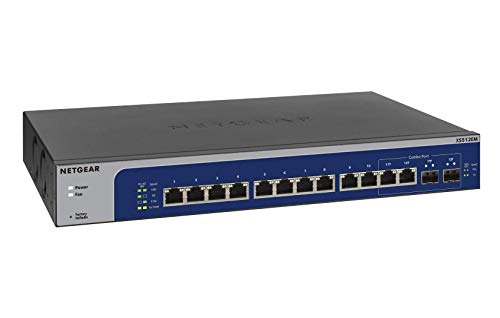
- 12 ports support 1G through 10G multi-gig speeds
- Easy Smart Managed software for basic network controls
- Desktop or rackmount placement with quiet, efficient operation
Best For: Small professional networks needing flexible speeds and simple management
Best Plug-and-Play 10G Switch

- Five 10G RJ45 ports with up to 100Gbps switching capacity
- Auto-negotiates from 100Mbps through 10G
- Fanless metal design supports desktop or wall mounting
Best For: Small high-speed device clusters that need simple unmanaged 10G connectivity
Best Managed 10G Capacity – 18-Port NETGEAR XS516TM
The NETGEAR XS516TM is a strong choice among multi-gigabit network switches for professionals who need numerous high-speed wired connections with centralized management. It combines 16 auto-negotiating 10G/multi-gigabit ports with two 10G SFP+ ports for fiber connectivity or expansion.
Best For: Professional offices, workgroups, and infrastructure deployments that need 10G copper connectivity, SFP+ expansion, and managed network controls.
Pros:
- Provides 16 10G/multi-gigabit Ethernet ports.
- Includes two 10G SFP+ ports for fiber connections or expansion.
- Offers smart management, SNMP support, and one year of NETGEAR Insight.
- Supports wall mounting or rack mounting in a compact metal enclosure.
Cons:
- Managed features may be more than a simple plug-and-play network requires.
- It has no more than two SFP+ ports for fiber-based expansion.
For professionals building a dense 10G network, this switch stands out for its port count and management flexibility. IEEE 802.3az support also helps reduce power use during operation.
Best for Advanced Routing – MikroTik CRS312 10G Switch
MikroTik CRS312-4C+8XG-RM – Network Switch L3, 10G, Ethernet (100/1000/10000), 1U, White
Check Price On AmazonThe MikroTik CRS312-4C+8XG-RM is a rack-mountable option for professionals seeking multi-gigabit network switches for professionals with a 10G-focused infrastructure. It provides 12 ports, including 10G Ethernet and SFP+ connectivity, in a metal 1U-style chassis.
Best For: Rack-based professional networks that need 10G Ethernet and SFP+ interfaces in a compact metal enclosure.
Pros:
- Offers 12 network ports for professional deployments.
- Supports Ethernet speeds up to 10,000 Mbps and SFP+ connectivity.
- Uses a durable metal case suited to rack installations.
Cons:
- The supplied notes do not specify detailed management or routing features beyond the L3 designation.
- No warranty is listed in the supplied product details.
- Its listed 220V voltage may require compatibility checking before installation.
This MikroTik model is best evaluated as a compact, high-speed rack switch for users already comfortable with professional network hardware. Confirm power and configuration requirements before deploying it.
Best for Managed AV Networks – NETGEAR AV Line M4250
The NETGEAR AV Line M4250-12M2XF is designed for professional environments handling high-bandwidth AV and network workloads. As one of the multi-gigabit network switches for professionals, it combines 12 1G/2.5G ports with two 10G SFP+ ports and Layer 3 management.
Best For: Professional AV installations and mixed-device networks using 2.5G access links and 10G fiber uplinks.
Pros:
- Provides 12 ports supporting 1G and 2.5G connections.
- Includes two 10G SFP+ ports for high-bandwidth uplinks.
- Uses Layer 3 switching for more advanced network deployments.
- Includes rack-mountable hardware and listed warranty support.
Cons:
- It has fewer 10G ports than switches built around 10G copper connectivity.
- The supplied details do not specify the switch’s full management feature set.
With its 2.5G access ports and 10G SFP+ uplinks, this M4250 model is a practical fit for AV systems and professional networks that need a blend of access speeds. Its Layer 3 classification adds flexibility for more structured deployments.
Best Plug-and-Play 10G Value – TP-Link TL-SX1008
The TP-Link TL-SX1008 is a straightforward option among multi-gigabit network switches for professionals who want eight high-speed connections without configuration software. Its ports auto-negotiate across 100Mb, 1G, 2.5G, 5G, and 10G speeds, making it suitable for mixed-speed devices.
Best For: Small offices, labs, studios, and workgroups connecting 10G NAS devices, servers, computers, or Wi-Fi access points with minimal setup.
Pros:
- Provides eight 10G/multi-gigabit RJ45 ports.
- Auto-negotiates across five listed network speeds.
- Offers up to 160 Gbps of switching capacity.
- Supports desktop or rackmount placement and includes a metal casing.
Cons:
- As an unmanaged switch, it does not provide the advanced controls of a managed model.
- It does not include SFP+ ports for fiber connectivity.
- Provides fewer ports than larger professional switches.
The TL-SX1008 is a sensible choice when the priority is fast wired connectivity with simple installation. Its broad auto-negotiation range helps it accommodate a mix of older and newer Ethernet equipment.
Powerhouse PoE Expansion – NETGEAR MS324TXUP
For professionals who need multi-gigabit network switches for professionals with substantial power demands, the NETGEAR MS324TXUP combines 24 2.5Gbps ports with Ultra60 PoE++ and four 10G SFP+ connections. Its smart-managed controls and desktop or rack-mount flexibility make it suitable for growing wired networks.
Best For: Professional networks powering numerous compatible devices while maintaining multi-gigabit and 10G uplink capacity.
Pros:
- 24 auto-negotiating 2.5Gbps Ethernet ports can work with existing Cat5e or Cat6 cabling.
- 24 Ultra60 PoE++ ports provide a substantial 720W total power budget.
- Four 10G SFP+ ports support fiber connectivity and network expansion.
- Smart management, SNMP support, optional Insight cloud management, and flexible mounting add deployment versatility.
Cons:
- Its 28-port design and 6.12 kg weight may be more than smaller installations need.
- PoE++ capability may be unnecessary if connected devices do not require power over Ethernet.
This is the most feature-rich option in the group for dense, power-hungry deployments. Choose it when PoE capacity, managed control, and 10G expansion matter more than a compact footprint.
Managed Compact Uplinks – TP-Link Omada SG3210X-M2
The TP-Link Omada SG3210X-M2 is a compact choice among multi-gigabit network switches for professionals, offering eight 2.5Gbps RJ45 ports and two 10G SFP+ slots. L2+ management, centralized Omada cloud control, and internal traffic routing make it a strong fit for organized small-network deployments.
Best For: Small professional networks that need managed 2.5Gbps access ports, 10G uplinks, and centralized administration.
Pros:
- Eight 2.5Gbps RJ45 ports provide high-speed connections for network devices.
- Two 10Gbps SFP+ slots support high-bandwidth uplinks and non-blocking switching capacity.
- Omada cloud management, app access, ZTP, and intelligent monitoring simplify administration.
- L2/L3/L4 QoS, IGMP snooping, and static routing support more controlled traffic handling.
Cons:
- Eight RJ45 ports provide less endpoint capacity than larger professional switches.
- It is a managed switch, so setup and administration are more involved than with plug-and-play models.
For teams already using or considering the Omada ecosystem, this switch balances multi-gigabit access with centralized management in a relatively compact form. It is a practical middle ground between unmanaged simplicity and larger PoE-focused hardware.
Quiet Plug-and-Play Upgrade – TP-Link TL-SG108-M2
For buyers who want multi-gigabit network switches for professionals without management overhead, the TP-Link TL-SG108-M2 provides eight 2.5Gbps ports in an unmanaged, fanless metal enclosure. It automatically negotiates 100Mbps, 1Gbps, or 2.5Gbps connections and can be placed on a desktop or mounted on a wall.
Best For: Quiet small-office or workstation networks needing straightforward 2.5Gbps connectivity.
Pros:
- Eight 2.5Gbps ports offer up to 40Gbps of switching capacity.
- Auto-negotiation supports 100Mbps, 1Gbps, and 2.5Gbps devices for broad compatibility.
- Plug-and-play setup requires no software installation or configuration.
- Fanless operation, a metal case, and desktop or wall mounting suit quiet workspaces.
Cons:
- Unmanaged operation does not provide the traffic controls or centralized administration of managed models.
- It has no listed PoE ports or 10G SFP+ slots for powered devices or fiber uplinks.
This is the simplest and quietest option for adding multi-gigabit Ethernet to a small network. Select it when reliable 2.5Gbps connections and easy installation are the priorities, rather than advanced configuration.
Best Rackmount Multi-Gig Upgrade – TRENDnet TEG-S50204
For professionals building multi-gigabit network switches for professionals into a rack-ready network, the TRENDnet TEG-S50204 combines sixteen 2.5GbE copper ports with four 10G SFP+ ports. Its 160Gbps switching capacity, VLAN tag passthrough, and fanless design make it a practical fit for offices and infrastructure installations that need faster links without added operating noise.
Best For: Rack-mounted offices, government-focused installations, and networks that need both 2.5GbE device connectivity and 10G uplinks.
Pros:
- Sixteen 2.5G RJ-45 ports support speeds up to 2.5Gbps over Cat5e or better cabling.
- Four 10G SFP+ ports add high-speed fiber or compatible uplink options.
- Fanless 1U metal housing reduces operating noise and includes rack-mount hardware.
- NDAA and TAA compliance plus TRENDnet lifetime protection support deployment planning.
Cons:
- The SFP+ ports require compatible modules or cabling and are not RJ-45 ports.
- Its 20-port rackmount format may be more hardware than a small desktop network requires.
The TEG-S50204 is a strong choice when port density, 2.5GbE access, and 10G connectivity matter more than compact size. Its fanless rackmount design is especially useful in quieter professional environments.
Best Managed 10G Flexibility – NETGEAR XS512EM
The NETGEAR XS512EM is a flexible option among multi-gigabit network switches for professionals who want basic management features without a complex enterprise interface. It provides twelve 1G/2.5G/5G/10G Ethernet ports, plus two 1G/10G SFP+ ports that are shared, in a desktop- or rackmount-ready design.
Best For: Small professional networks that need multi-speed Ethernet, simple configuration and monitoring, and flexible desktop or rack placement.
Pros:
- Twelve copper ports automatically support 1G, 2.5G, 5G, and 10G connections.
- Easy Smart Managed software provides basic configuration, security, and monitoring capabilities.
- Desktop or rackmount placement is supported, with mounting hardware included.
- IEEE 802.3az energy-efficient design and quiet operation suit office environments.
Cons:
- The two SFP+ ports are shared, which limits simultaneous use with their associated Ethernet ports.
- It offers basic smart-management capabilities rather than a more advanced managed-switch feature set.
Choose the XS512EM when you need broad speed compatibility and straightforward management in a 12-port platform. Its shared SFP+ design should be accounted for when planning port usage.
Best Plug-and-Play 10G Switch – TP-Link TL-SX105
The TP-Link TL-SX105 is a compact unmanaged choice for multi-gigabit network switches for professionals who want fast connectivity without software setup. Its five 10G ports automatically negotiate among 100Mbps, 1G, 2.5G, 5G, and 10G, making it useful for connecting high-speed workstations, NAS devices, servers, and Wi-Fi access points.
Best For: Small offices, labs, creative workstations, and high-speed device clusters that need simple 10G connectivity.
Pros:
- Five 10G ports provide up to 100Gbps of switching capacity.
- Auto-negotiation supports five link speeds for compatibility with mixed-speed devices.
- Plug-and-play operation requires no software installation or configuration.
- Fanless metal construction supports quiet desktop or wall-mounted installation.
Cons:
- As an unmanaged switch, it does not provide configurable VLAN, monitoring, or security controls.
- Five ports may be limiting for larger professional deployments.
- It uses RJ45 ports rather than dedicated SFP+ connectivity.
The TL-SX105 is best when installation simplicity and 10G-capable copper connectivity are the priorities. It works well as a compact high-speed aggregation point, but advanced network management requires a different switch class.
How We Picked the Best Multi-Gigabit Network Switches for Professionals
We selected switches across the main professional networking scenarios: high-throughput file transfer, office connectivity, AV deployment, wireless backhaul, PoE expansion, and rack-based infrastructure. We considered port speed, total port count, uplink capacity, management features, installation flexibility, and whether each model is managed or unmanaged.
The list includes 2.5GbE switches for upgrading existing cabling and endpoints, 10GbE models for demanding workstations and servers, and mixed-port designs that combine multi-gig copper with 10G SFP+ uplinks. PoE availability, cloud management, VLAN support, QoS, rack mounting, and fan or noise considerations are especially relevant for professional installations.
Quick Comparison
| Best For | What to Prioritize |
|---|---|
| Small desk or studio | Five to eight ports, quiet operation, simple setup |
| Growing office | Managed features, VLANs, QoS, and higher port density |
| Wi-Fi 6E/7 access points | 2.5GbE or faster ports, PoE where required |
| Servers and workstations | 10GbE copper or SFP+ uplinks and sufficient backplane capacity |
| AV and production networks | Predictable management, QoS, rack compatibility, and high bandwidth |
| Cloud-managed deployments | Centralized monitoring, configuration, and lifecycle management |
Key Buying Factors for Multi-Gigabit Network Switches for Professionals
Port Speed and Layout
Match the switch to your endpoints rather than choosing speed in isolation. A 2.5GbE switch can be the most practical upgrade for modern access points and desktops, while 10GbE is more appropriate for NAS arrays, video workstations, servers, and core links. Check whether every port supports the advertised speed or whether only selected uplinks do.
Management and Network Control
Unmanaged switches are easy to deploy but provide little visibility or configuration. Managed and smart-managed models can add VLANs, link aggregation, QoS, monitoring, and access controls. These features matter when separating guests, voice, cameras, production traffic, or administration systems.
PoE, Uplinks, and Installation
If the switch will power access points, phones, cameras, or other devices, confirm both the PoE standard and total power budget. SFP+ uplinks can extend the switch to a faster core or server without consuming copper ports. Also verify rack depth, included mounting hardware, cooling, and noise before placing a unit in a workspace.
Cabling and Compatibility
Multi-gigabit Ethernet often works over existing Cat5e or better cabling, but distance, cable quality, transceivers, and patch panels still affect results. Confirm that your adapters, routers, NAS devices, and SFP+ modules support compatible speeds and standards.
Who Should Buy Which Multi-Gigabit Network Switches for Professionals?
Choose an unmanaged 5- or 8-port model for a straightforward desk, studio, or small lab expansion. Pick a managed 2.5GbE switch when you need VLANs, centralized control, QoS, or a cleaner upgrade path for an office. A 10GbE model is the better fit for large file transfers, high-performance storage, servers, and content-production workflows. Choose a PoE multi-gigabit switch for networks built around powered access points or other edge devices, and favor a rackmount L2/L3 or cloud-managed platform when several users, segments, and uplinks must be administered reliably.