Multi-gigabit networking helps small businesses move large files faster, reduce bottlenecks, and make better use of high-speed internet, Wi-Fi 6E, and Wi-Fi 7 access points.
These 10 switches cover practical 2.5GbE upgrades, 10GbE workstation connections, smart management features, and larger office networks.
Best 10 Multi-Gigabit Network Switches for Small Businesses Picks for 2026
Quiet 2.5G Upgrade

- Eight 2.5Gbps RJ45 ports
- Fanless, plug-and-play design
- Desktop or wall mounting
Best For: Small offices needing simple, quiet 2.5Gbps expansion
Thermally Designed Value Pick

- Eight adaptive 2.5Gbps ports
- Fanless metal construction
- Plug-and-play mixed-speed support
Best For: Small offices making an uncomplicated 2.5Gbps upgrade
Rack-Ready Multi-Gig Backbone

- Sixteen 2.5Gbps RJ45 ports
- Four 10G SFP+ uplinks
- 160Gbps switching capacity
Best For: Rack-based offices with dense connectivity and 10G uplink needs
Best Managed Compact Switch
NETGEAR MS308E 8-Port 2.5G Switch

- Eight 2.5Gbps RJ45 ports
- Easy Smart VLAN and QoS controls
- Fanless desktop or wall-mount design
Best For: Small offices needing simple network management
Managed Multi-Gig Hub
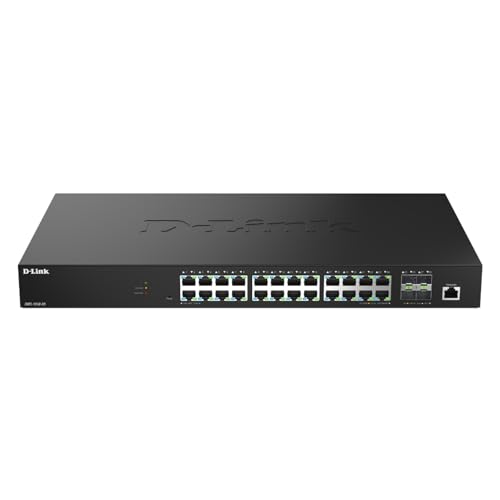
- 24 x 2.5GbE ports and 4 x 10G SFP+ uplinks
- Supports web, CLI, SNMP, and centralized management
- Includes enterprise-oriented security and monitoring features
Best For: Growing offices with many multi-gig devices and a managed rack network
All-10G Desktop Power

- 5 x 10G/multi-gig RJ45 ports
- Auto-negotiates from 100Mbps to 10Gbps
- Fanless, plug-and-play metal design
Best For: Small workgroups connecting several high-speed copper devices
Quiet 2.5G Upgrade – Omada DS108G-M2
For small businesses seeking multi-gigabit network switches for small businesses without a complicated setup, the Omada DS108G-M2 offers eight 2.5Gbps RJ45 ports. It is a practical plug-and-play choice for workstations, NAS devices, Wi-Fi 6 access points, and other high-speed equipment.
Best For: Small offices and workspaces that need eight quiet 2.5Gbps wired connections.
Pros:
- Eight 2.5Gbps ports provide up to 40Gbps of switching capacity.
- Plug-and-play operation requires no configuration or central management.
- Fanless metal design supports quiet operation and heat dissipation.
- Desktop and wall-mount installation options add placement flexibility.
Cons:
- As an unmanaged switch, it does not offer advanced traffic-management features.
- All ports are 2.5Gbps, with no dedicated 10Gbps uplink.
The DS108G-M2 is a straightforward way to expand a small business network to 2.5Gbps while avoiding new Cat6 wiring. Its silent operation and compact installation options make it especially suitable for office environments.
Thermally Designed Value Pick – UGREEN 8-Port 2.5G Switch
The UGREEN 8-Port 2.5G Switch is a simple option for businesses upgrading to multi-gigabit network switches for small businesses. Its eight ports automatically adapt to 100Mbps, 1Gbps, and 2.5Gbps connections, making it useful for mixed-speed offices with NAS devices, PCs, routers, and other equipment.
Best For: Small offices wanting an easy mixed-speed transition to 2.5Gbps networking.
Pros:
- Eight 2.5Gbps ports support fast connections for NAS devices, gaming PCs, and Wi-Fi 6/6E routers.
- Automatic speed detection supports 100Mbps, 1Gbps, and 2.5Gbps devices.
- Fanless operation, metal housing, heatsinks, and ventilation support quiet, stable use.
- Supports desktop or wall placement and includes non-slip feet.
Cons:
- It is unmanaged, so there are no listed VLAN, QoS, or other configuration features.
- It lacks 10Gbps ports for high-speed uplinks.
UGREEN focuses on low-effort deployment and thermal management here. It is a sensible fit when a small business needs several 2.5Gbps ports but does not require centralized management or a faster backbone connection.
Rack-Ready Multi-Gig Backbone – TRENDnet TEG-S50204
For larger small-business deployments comparing multi-gigabit network switches for small businesses, the TRENDnet TEG-S50204 provides 16 2.5Gbps RJ45 ports plus four 10G SFP+ ports. Its 160Gbps switching capacity and rack-mountable 1U metal housing make it suited to offices that need both dense edge connectivity and faster uplinks.
Best For: Rack-based offices needing many 2.5Gbps ports and 10Gbps fiber or DAC uplinks.
Pros:
- Sixteen 2.5Gbps RJ45 ports support dense multi-gig device connectivity.
- Four 10G SFP+ ports provide high-speed uplink capability.
- 160Gbps switching capacity supports a substantial wired network.
- Fanless, 1U rack-mountable design operates quietly and includes a mounting kit.
Cons:
- The rack-ready 17.36-inch housing may be excessive for very small or desktop-only setups.
- Its SFP+ uplinks require compatible transceivers or cabling.
- The supplied details emphasize VLAN passthrough rather than a full set of configurable Layer 2 features.
The TEG-S50204 is the strongest capacity choice in this group for a business closet or rack. It combines a high port count with 10G SFP+ expansion, while its fanless design and lifetime manufacturer protection support long-term deployment.
Lite-Managed NAS Hub – QNAP QSW-L2110-10T-US
The QNAP QSW-L2110-10T-US adds light management to the multi-gigabit network switches for small businesses category. It combines eight 2.5GbE RJ45 ports with two 10GbE Base-T ports, giving small offices, creators, and teams faster edge connections and high-speed links to a NAS or core network.
Best For: Small businesses and creator teams that need 2.5GbE access with 10GbE copper uplinks.
Pros:
- Eight 2.5GbE ports connect workstations, access points, and other edge devices.
- Two 10GbE RJ45 ports support high-speed NAS or core-network uplinks.
- Web-based lite management includes VLAN, QoS, IGMP Snooping, and Link Aggregation.
- Fanless design supports quieter office operation.
Cons:
- With 10 total ports, it offers less expansion capacity than the 20-port TRENDnet model.
- Its two-year warranty is shorter than some competing coverage options listed here.
The QNAP stands out when a small business needs more than plug-and-play switching but does not require a fully featured enterprise platform. Its 10GbE copper uplinks and practical Layer 2 tools make it particularly well matched to NAS-heavy workflows.
Best Managed Compact Switch – NETGEAR MS308E 8-Port 2.5G Switch
The NETGEAR MS308E is a practical choice for small businesses seeking multi-gigabit network switches with light management capabilities. Its eight 2.5Gbps RJ45 ports, auto-negotiation, VLAN support, QoS, port monitoring, and compact fanless metal design suit offices upgrading existing Cat5e or Cat6 cabling.
Best For: Small offices that need manageable 2.5Gbps connectivity without a noisy fan or complex enterprise hardware.
Pros:
- Eight 2.5Gbps ports support high-speed wired connections.
- Easy Smart management includes VLAN, QoS, port monitoring, and security features.
- Fanless, energy-efficient design supports quiet desktop or wall-mounted installation.
Cons:
- Provides eight ports, which may be limiting for a growing office.
- Designed for use in the U.S. and Canada only.
Choose this model when straightforward network controls matter as much as multi-gigabit speed. It is a well-balanced fit for offices that want more oversight than an unmanaged switch provides.
Best Plug-and-Play Value – TP-Link TL-SG108-M2 8-Port 2.5G
The TP-Link TL-SG108-M2 keeps multi-gigabit network switches simple, offering eight 2.5Gbps ports and up to 40Gbps of switching capacity without software setup. Auto-negotiation supports 100Mbps, 1Gbps, and 2.5Gbps devices, while the fanless metal enclosure works on a desk or wall.
Best For: Small businesses that want an easy wired-speed upgrade for Wi-Fi access points, NAS devices, servers, and workstations.
Pros:
- All eight ports support up to 2.5Gbps.
- Plug-and-play operation requires no configuration or software installation.
- Works with existing Cat5e wiring and includes flow control for reliable transfers.
- Fanless metal design supports quiet desktop or wall-mounted use.
Cons:
- Unmanaged design does not provide VLAN, QoS, or access-control configuration.
- Cables are not included.
This is the straightforward option in the group. It makes sense when the priority is adding multi-gigabit ports quickly, rather than controlling traffic or segmenting the network.
Best for 10G Uplinks – TRENDnet TEG-3102WS Multi-Gig Switch
The TRENDnet TEG-3102WS is built for small businesses that need multi-gigabit network switches with room for faster backbone connections. It combines eight 2.5GBASE-T ports with two 10G SFP+ slots, web-based management, an 80Gbps switching capacity, VLAN and QoS tools, link aggregation, and access-control features.
Best For: Growing offices that need managed 2.5Gbps edge ports plus flexible 10G uplinks for servers, storage, or network expansion.
Pros:
- Eight 2.5Gbps RJ45 ports support 100Mbps and 1Gbps devices as well.
- Two 10G SFP+ slots provide high-speed uplink capability.
- Web Smart management includes VLAN, QoS, link aggregation, monitoring, and access controls.
- Metal housing, rackmount hardware, and lifetime manufacturer protection support business deployment.
Cons:
- SFP+ uplinks require compatible modules or cabling.
- Its broader management feature set may be more than a basic office needs.
- Availability and listed protection are limited to the U.S. and Canada.
Among these options, the TEG-3102WS offers the clearest upgrade path for a more structured network. Its 10G SFP+ slots and extensive management tools make it better suited to businesses planning beyond basic 2.5Gbps access.
Simple 10G Upgrade – NETGEAR GS108MX
The NETGEAR GS108MX is a practical choice for small businesses that need multi-gigabit network switches with minimal setup. It combines one 10G/multi-gig port with seven 1Gbps Ethernet ports, and its auto-negotiation works with existing Cat5e or Cat6 cabling.
Best For: Small offices that want a straightforward 10G connection for a server, NAS, or other high-speed device while retaining several standard Gigabit ports.
Pros:
- One 10G/multi-gig port plus seven 1Gbps Ethernet ports
- Plug-and-play unmanaged operation requires no software or configuration
- Fanless metal design supports quiet desktop or wall-mounted placement
- IEEE 802.3az Energy Efficient Ethernet helps reduce power consumption
Cons:
- Only one port supports 10G/multi-gig connectivity
- Unmanaged design does not provide VLAN, monitoring, or other advanced controls
Choose this switch when ease of deployment matters more than extensive management features. It is a compact way to add one high-speed link without replacing every existing Gigabit connection.
Managed Multi-Gig Hub – D-Link DMS-1250-28
D-Link 28-Port Multi-Gigabit Smart Managed Switch with 4 10G SFP+ & 24 2.5G Ports (DMS-1250-28)
Check Price On AmazonThe D-Link DMS-1250-28 is built for growing small-business networks that need many fast connections and centralized control. It provides 24 2.5GbE ports for access devices and four 10G SFP+ uplinks for servers, storage, or core-switch connections.
Best For: Small businesses with multiple Wi-Fi access points, cameras, NAS devices, signage, or workgroup PCs that need managed 2.5GbE access and 10G uplinks.
Pros:
- 24 2.5GbE ports support high-speed device and access-point connections
- Four 10G SFP+ uplinks provide fast connections to storage, servers, or core switches
- Web UI, CLI, SNMP, Nuclias Connect, and D-View 8 support centralized management
- Includes features such as 802.1X, ACLs, DHCP snooping, and IP-MAC binding
Cons:
- Its 28-port rack-style design is more equipment than a very small office may need
- SFP+ uplinks require compatible SFP+ equipment or modules
- Managed features require more planning and configuration than an unmanaged switch
This is the strongest fit when a business expects its network to grow and needs security, monitoring, and traffic-control options. The rack-mountable metal chassis and broad port count suit structured network deployments.
All-10G Desktop Power – TP-Link TL-SX105
The TP-Link TL-SX105 is a compact option for small businesses that need multi-gigabit network switches for several high-throughput devices. All five RJ45 ports support auto-negotiated speeds from 100Mbps through 10Gbps, making it suitable for 10G NAS devices, servers, Wi-Fi access points, and capable PCs.
Best For: Small offices or workgroups connecting several 10G or multi-gig devices without needing VLANs or other managed-switch configuration.
Pros:
- Five 10G/multi-gig ports offer up to 100Gbps of switching capacity
- Auto-negotiates 100Mbps, 1G, 2.5G, 5G, and 10G link speeds
- Fanless design, metal casing, and desktop or wall-mounting options suit office use
- Plug-and-play setup requires no software installation or configuration
Cons:
- Five-port capacity may be limiting as the network expands
- Unmanaged operation does not offer centralized monitoring or traffic controls
- It is designed for copper RJ45 connections and does not include SFP+ uplink ports
The TL-SX105 makes sense when the priority is giving several nearby devices access to 10G-class copper connectivity. Its simple operation keeps deployment easy, while the multi-speed support accommodates a range of existing equipment.
How We Picked the Best Multi-Gigabit Network Switches for Small Businesses
We selected switches across the main needs of a small office: simple plug-and-play expansion, smart management, high port counts, 2.5GbE access, and 10GbE uplinks. We considered port speed and mix, total capacity, management features, installation flexibility, and suitability for common business equipment such as servers, workstations, NAS devices, wireless access points, and routers.
Because requirements vary widely, this list includes both unmanaged models for straightforward upgrades and managed or smart-managed switches for VLANs, traffic control, monitoring, and more structured networks.
Quick Comparison
- Best for simple 2.5GbE expansion: Omada DS108G-M2, UGREEN 8-Port 2.5Gb, or TP-Link TL-SG108-M2.
- Best for smart management: NETGEAR MS308E or TRENDnet TEG-3102WS.
- Best for 10GbE connections: TP-Link TL-SX105 or NETGEAR GS108MX.
- Best for larger networks: D-Link DMS-1250-28 or TRENDnet TEG-S50204.
- Best for a compact multi-gig core: QNAP QSW-L2110-10T-US.
Key Buying Factors for Multi-Gigabit Network Switches for Small Businesses
Port Speeds and Port Types
Confirm whether you need 1GbE, 2.5GbE, 5GbE, or 10GbE. Multi-gigabit copper ports can often negotiate at multiple speeds, which makes them useful for mixed hardware. SFP+ ports may provide flexible fiber or direct-attach connections, but they can require compatible modules or cables.
Unmanaged Versus Managed
Unmanaged switches are usually the easiest choice for adding ports without changing network settings. Smart-managed and fully managed models add features such as VLANs, link aggregation, QoS, monitoring, and loop protection. Choose management capabilities when the switch will support separate staff, guest, voice, camera, or server traffic.
Capacity and Layout
Count current devices and leave room for growth. Also check the uplink arrangement: a switch with many 2.5GbE ports may still need faster uplinks to prevent congestion between access devices and the router, server, or core switch.
Installation, Noise, and Power
Desktop models suit small offices and work areas, while rack-mount designs are better for wiring closets. Check dimensions, cooling, fan noise, power requirements, and whether the unit supports the mounting method your site uses.
Who Should Buy Which Multi-Gigabit Network Switches for Small Businesses?
Choose an unmanaged 2.5GbE model if you want a simple upgrade for a few modern computers, access points, or NAS devices. Select a 10GbE unmanaged switch when fast server, workstation, or storage links matter more than advanced controls. A smart-managed option is better for growing offices that need VLANs, monitoring, or traffic prioritization. Larger teams, multiple departments, and central wiring closets should consider higher-port-count managed switches with 10G uplinks.
Before buying, verify cable quality, adapter compatibility, router speeds, and the real negotiated speed of each connected device. The right switch should improve the slowest important link without forcing you to replace every component at once.