Working on tiny components is easier when you can see solder joints, traces, and board details clearly. The best portable microscope soldering cameras combine useful magnification with a stable stand, practical lighting, and a display that keeps your hands free.
This roundup compares 10 options for electronics repair, hobby soldering, inspection, and phone or PCB work. Consider the camera resolution, screen or connection options, working distance, and stand design before choosing.
Best 10 Portable Microscope Soldering Cameras Picks for 2026
Best Wireless Portable Pick
Skybasic WiFi Handheld Microscope

- WiFi viewing on Android and iOS devices
- USB support for Windows and Mac
- Compact body with eight adjustable LEDs
Best For: Quick portable inspections and mobile viewing
Best Complete Soldering Station

- 2160p HDMI output and three interchangeable lenses
- Helping hands, tool holder, extension base, and mat included
- Windows measurement software with photo/video capture
Best For: Dedicated electronics repair benches
Best Budget USB Option
Bysameyee 40X–1000X Microscope Camera
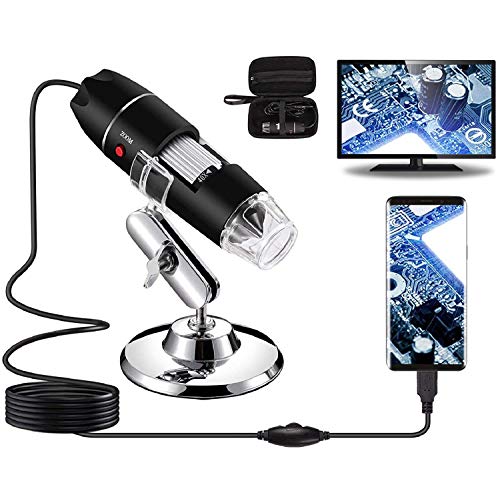
- 40X–1000X advertised magnification range
- Eight dimmable LEDs and included metal stand
- Works with Windows, Mac, Linux, and compatible Android devices
Best For: Affordable connected-device inspection
Best Hands-Free Pick
5-Inch C-Clamp Soldering Microscope

- 5-inch IPS display works without a computer
- C-clamp and flexible arm support hands-free PCB work
- Manual focus; Micro SD card required for saving
Best For: Bench electronics repair and solder-joint inspection
Best Mobile-Friendly Option
Full HD USB Handheld Microscope

- Works with phones, tablets, and computers
- 1080P photo and video capture
- Lightweight handheld or stand-based design
Best For: Flexible mobile and desktop inspection
Best Industrial-Style Setup

- 13MP camera with 1080P HDMI and VGA output
- 150X zoom with up to 1000mm working distance
- 56-LED adjustable ring light and foldable stand
Best For: Feature-rich electronics workbenches and display setups
Portable Starter Pick

- USB viewing on compatible computers and Android OTG phones
- Adjustable LED lighting and included metal stand
- Portable kit with OTG adapter and carrying case
Best For: Beginners and casual electronics inspection
Large-Screen Workbench Pick
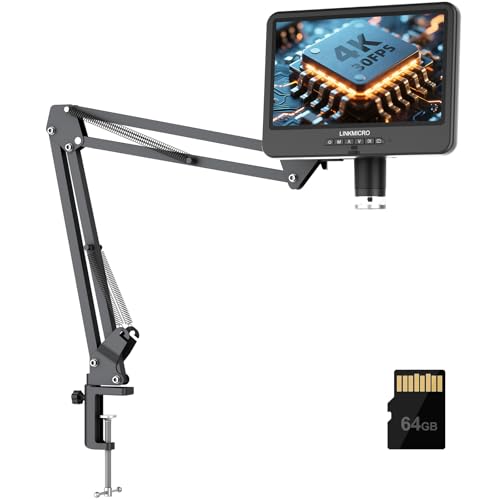
- 4K 30FPS viewing on a built-in 10.1-inch IPS display
- Flexible arm offers extended soldering clearance
- HDMI and USB connectivity plus recording support
Best For: PCB repair and large, comfortable workbench setups
Flexible Dual-Use Pick

- 4K 30FPS HDMI output with a 5-inch IPS screen
- C-clamp flex arm supports hands-free soldering
- Detachable handheld design folds flat for storage
Best For: Repairers needing both desktop stability and portability
Best Flexible-Arm Pick – Andonstar AD109 10.1-Inch Soldering Microscope
For portable microscope soldering cameras that need a generous work area, the Andonstar AD109 combines a 10.1-inch IPS display with a long, repositionable boom arm. Its 1080p video, 12MP photos, adjustable lighting, and USB-C computer connectivity make it a flexible choice for electronics repair and inspection.
Best For: Soldering large PCBs, electronics work, and coin inspection where a long-reach stand and built-in screen are useful.
Pros:
- Large 10.1-inch IPS screen with 1080p video and 12MP photos.
- 27.56-inch boom arm with 360-degree rotation and 170-degree tilt range.
- 8-LED camera lighting plus a 56-LED ring light with adjustable brightness.
- Works with Windows and Mac through USB-C and includes a 32GB SD card.
Cons:
- The remote control requires batteries, which are not included.
- Its corded setup and larger boom arm are less convenient for truly handheld use.
The AD109 is a strong option when workspace flexibility matters more than compact portability. Its wide-reaching arm and large display suit hands-on repair benches, while the included remote helps reduce the need to touch the microscope during capture.
Best Wireless Portable Pick – Skybasic WiFi Handheld Microscope
The Skybasic is a practical choice among portable microscope soldering cameras when you want to view objects on a phone, tablet, or computer. Its handheld design, WiFi connection for Android and iOS, USB computer support, and adjustable LEDs make it convenient for quick inspections, though it is better suited to basic magnification than precision professional biology work.
Best For: Portable exploration, basic electronics checks, and viewing plants, minerals, insects, or other small objects on a mobile device.
Pros:
- Wireless connection to Android and iOS devices through its WiFi hotspot.
- USB connectivity supports Windows and Mac computers.
- Compact handheld design with eight adjustable LED lights.
- One-button photo and video capture through the device or app.
Cons:
- Computer video resolution is listed as 720p, compared with 1080p on smartphones.
- The 3–60 mm focal range requires careful positioning for a sharp image.
- It is described as a fixed-focus magnifying glass rather than a traditional professional microscope.
Choose the Skybasic for convenience and device compatibility rather than maximum image detail. Its wireless operation makes it easy to carry and use away from a workbench, while the focal-distance limits may make delicate soldering less comfortable than with a dedicated stand-mounted model.
Best Complete Soldering Station – Andonstar AD246S-M Plus
For a dedicated repair bench, the Andonstar AD246S-M Plus is one of the most complete portable microscope soldering cameras in this group. It pairs 2160p HDMI output with three interchangeable lenses, a boom-arm station, helping hands, tool storage, and an anti-static mat for more organized soldering and inspection.
Best For: Electronics repairers who want a full soldering workstation with high-resolution HDMI viewing and multiple magnification ranges.
Pros:
- 2160p video output with HDMI support for larger screens.
- Three lenses cover soldering, coins and objects, and biological slides.
- Includes helping hands, tool holder, extension base, storage boxes, and anti-static mat.
- Supports Windows measurement software plus photo and video capture.
Cons:
- Its extensive station setup is less portable than a handheld microscope camera.
- The highest magnification ranges depend on the specific lens and viewing setup.
The AD246S-M Plus makes the most sense when you want a purpose-built soldering station rather than a grab-and-go camera. Its accessory package reduces the need to assemble a separate work area, and the interchangeable lenses broaden its usefulness beyond electronics.
Best Budget USB Option – Bysameyee 40X–1000X Microscope Camera
The Bysameyee offers a straightforward USB approach to portable microscope soldering cameras. It connects to Windows, Mac, Linux, and compatible Android devices, adds adjustable LED illumination, and includes a metal stand and carrying case for basic PCB, coin, and small-object inspection.
Best For: Budget-minded users who want a compact USB microscope for occasional electronics checks, collecting, or educational use.
Pros:
- Advertised 40X–1000X magnification range.
- Eight dimmable LEDs with a control knob and diffuser.
- Includes a metal stand, OTG adapter, ruler, driver, and carrying case.
- Supports image capture and video recording; Windows users get measurement software.
Cons:
- It does not work with iPhone or iPad devices.
- Measurement software is limited to Windows users.
- It requires a connected device rather than providing its own display.
The Bysameyee is a sensible low-cost entry point if you already have a compatible computer or Android phone. It is more convenient for occasional, close-up inspection than for a fully equipped soldering bench, and iOS users will need to consider another model.
Best Hands-Free Pick – 5-Inch C-Clamp Soldering Microscope
For portable microscope soldering cameras, this Aikokkl model is a practical choice when you want a dedicated screen and both hands available for PCB work. Its 5-inch IPS display, flexible arm, and C-clamp support close-up inspection without requiring a computer.
Best For: Electronics repairers who need a hands-free setup for solder joints and other small details.
Pros:
- 5-inch IPS screen can be used without a computer.
- C-clamp and flexible goose-neck arm help keep the work area clear.
- Supports up to 1000X digital magnification with manual distance and focus adjustment.
- Connects to Windows or Mac using native camera apps without third-party software.
Cons:
- It is not autofocus; you must adjust the arm and silver focus wheel manually.
- A Micro SD card, required for saving larger photo batches and 1080P videos, is not included.
- It is intended for micro-details rather than full-screen views of large objects.
This is a strong fit for bench repairs where a built-in display and stable, hands-free positioning matter most. Remember to budget for a compatible Micro SD card if recording is important.
Best Mobile-Friendly Option – Full HD USB Handheld Microscope
This Ninyoon model stands out among portable microscope soldering cameras for its broad device compatibility. The handheld 1080P microscope can connect to iPhone, iPad, Android, Windows, Mac, Linux, and Chrome systems for flexible inspection at home, in class, or at a workbench.
Best For: Users who want a lightweight microscope that can be viewed through a phone, tablet, or computer.
Pros:
- Supports direct plug-and-play use across major mobile and desktop platforms.
- Full HD 1080P imaging supports photos and video recording.
- Lightweight design weighs about 0.2 kg and can be used handheld or with its stand.
- USB transmission and local app storage are designed without cloud connectivity.
Cons:
- iOS and Android devices require the dedicated app.
- Some Oppo, Vivo, OnePlus, iQOO, and Realme phones require OTG to be enabled before use.
- Its 50-1000X range is digital magnification rather than a dedicated fixed soldering microscope setup.
Choose this model when portability and cross-device viewing are higher priorities than a permanently mounted repair station. Its small size also makes it convenient for quick handheld checks.
Best Industrial-Style Setup – 13MP HDMI Soldering Camera
For a more substantial portable microscope soldering camera setup, the NICE-POWER XVH2003 combines a 13MP camera, 1080P HDMI/VGA output, a zoom C-mount lens, and an adjustable foldable stand. It is designed for electronics repair and other close-up observation tasks where a larger display connection is useful.
Best For: Workbenches that need HDMI or VGA viewing, adjustable positioning, and strong ring-light illumination.
Pros:
- 13MP camera provides 1080P output through HDMI and VGA.
- 150X zoom lens offers up to a 1000mm working distance.
- 56-LED ring light has adjustable brightness and up to 60,000 lux illumination.
- Foldable stand has multiple adjustable sections, and the remote works in HDMI mode.
Cons:
- The 3.6-pound system is less lightweight than handheld alternatives.
- Remote-control batteries are not included.
- Remote functionality is available only when using HDMI output mode.
This is the most workstation-oriented option of the three. Its long working distance, dedicated lighting, and HDMI/VGA outputs make it better suited to a structured electronics bench than quick field inspection.
Portable Starter Pick – 1600X USB Microscope Camera
For shoppers comparing portable microscope soldering cameras, this compact USB model is an accessible option for basic electronics inspection, cell phone repair, and general magnification. It connects to compatible computers, tablets, and Android phones with OTG support, while its included stand and carrying case make it convenient to move between work areas.
Best For: Beginners, students, hobbyists, and occasional PCB or small-object inspection.
Pros:
- USB design supports compatible Windows, Linux, and Android OTG devices.
- Adjustable built-in LED lighting with a dimming control knob.
- Includes a metal stand, OTG adapter, ruler, driver, and carrying case.
- Supports image capture and video recording with installed software.
Cons:
- Compatibility is device- and operating-system-dependent.
- The supplied notes indicate that measurement software has limited platform support.
- Requires a connected device rather than providing a built-in display.
This is a practical, lightweight choice when portability and low-complexity USB viewing matter more than a dedicated screen or advanced stand. Its accessory bundle also makes it suitable for casual soldering and repair work.
Large-Screen Workbench Pick – 4K 10.1-Inch HDMI Microscope
This 4K model stands out among portable microscope soldering cameras for its spacious 10.1-inch IPS display and flexible arm stand. Its HDMI and USB connectivity supports real-time viewing, recording, and image capture, while the extended working range leaves more room for soldering tools and larger repair projects.
Best For: Electronics technicians, PCB repair, soldering demonstrations, and users who want a large integrated screen.
Pros:
- Provides 4K 30FPS output on the built-in display and compatible HDMI monitors.
- Flexible arm reaches up to 27.5 inches with a maximum working height of 23.6 inches.
- USB connection works with Windows and Mac camera software without additional software.
- Includes adjustable eight-level LED lighting, a 64GB microSD card, and remote control.
Cons:
- The larger screen and arm stand make it less compact than handheld microscope cameras.
- Its full setup is better suited to a workbench than truly mobile field use.
The LM208S-A is the strongest fit here for hands-on bench work where screen size, working clearance, and recording features are priorities. The foldable arm helps with storage, but the complete kit remains a more substantial setup than a pocket-style camera.
Flexible Dual-Use Pick – 4K 5-Inch HDMI Microscope
For buyers seeking portable microscope soldering cameras with both bench stability and handheld flexibility, this 4K unit offers a versatile design. The C-clamp flex arm supports hands-free soldering, while the detachable camera can be used independently or mounted to another compatible stand.
Best For: Electronics repairers who need a foldable desktop setup that can also handle mobile inspection.
Pros:
- 4K 30FPS HDMI output provides detailed real-time viewing on a compatible monitor.
- 360-degree flex arm extends up to 27.5 inches and clamps to a desk.
- Combines a 5-inch IPS display with handheld use and a standard 1/4-inch mounting thread.
- Offers adjustable LED lighting, 4K video recording, and 10MP photo capture.
Cons:
- Its 5-inch screen is smaller than the 10.1-inch display on the larger model.
- Achieving 4K viewing requires a compatible HDMI display or connected computer.
- The C-clamp setup needs a suitable desk edge or mounting surface.
This model balances portability with precision work better than a purely handheld camera. Its fold-flat stand, detachable body, and alternate mounting options make it a flexible choice for repair benches, compact workspaces, and occasional on-the-go inspection.
How We Picked These Portable Microscope Soldering Cameras
We focused on features that matter during hands-on electronics work: image clarity, usable magnification, built-in lighting, display or connection flexibility, stability, and workspace comfort. The selection includes dedicated HDMI soldering microscopes, USB and Wi-Fi handheld models, and compact systems with LCD screens, clamps, or articulated stands.
Magnification claims vary between manufacturers, so we treated the stated ranges as comparison points rather than guarantees. For soldering, a stable view and sufficient working distance are often more valuable than the highest advertised number.
Quick Comparison
- Best for large, comfortable viewing: Models with 7- or 10.1-inch screens.
- Best for low-latency display: HDMI microscope cameras connected directly to a monitor.
- Best for portability: Handheld USB or Wi-Fi microscopes with compact stands.
- Best for flexible positioning: Flex-arm stands and C-clamp designs.
- Best for detailed recording: 4K-capable cameras, provided lighting and focus remain adequate.
Key Buying Factors for Portable Microscope Soldering Cameras
Resolution and Image Delay
Higher resolution can make fine solder joints easier to inspect, but refresh rate and latency also affect usability. HDMI models commonly provide a direct display connection, while USB and wireless units may depend on software, device compatibility, or network performance.
Working Distance and Focus
Choose a camera that leaves enough room beneath the lens for an iron, tweezers, and components. Extremely high magnification can create a narrow viewing area and make hand movements harder to judge. Adjustable focus and a practical zoom range are more useful than maximum magnification alone.
Lighting and Glare Control
An adjustable LED ring or built-in light helps illuminate dark boards, but shiny solder can create glare. Look for brightness control, adjustable light direction, or the ability to add diffused lighting when inspecting reflective surfaces.
Stand Stability and Workspace Fit
A metal stand, C-clamp, or flex arm should remain steady when you touch the board. Check the base or clamp footprint, arm reach, height adjustment, and clearance for your tools. A portable design is only useful if it can be positioned securely.
Connections and Compatibility
HDMI is convenient for a dedicated monitor, while USB supports computers and sometimes mobile devices. Wireless models offer freedom from cables but may introduce setup steps or latency. Confirm operating-system, phone, tablet, and app compatibility before buying.
Who Should Buy Which Portable Microscope Soldering Cameras?
Choose a large-screen Andonstar-style system if you want a comfortable bench setup for frequent soldering and board inspection. Choose a 4K HDMI model if detailed viewing and direct monitor output are priorities. Choose a flex-arm or C-clamp model when desk space is limited or you need adjustable positioning around a repair area.
Choose a USB or Wi-Fi handheld microscope for occasional repairs, portability, and quick inspections. These are also practical for hobbyists who want to view work on a laptop, tablet, or phone. For demanding electronics work, prioritize stability and working distance over headline magnification.