The best professional book scanners make it easier to digitize books, records, photographs, and oversized documents without damaging pages or sacrificing readability.
These 10 options cover overhead capture, automatic page flattening, OCR, large-format scanning, portability, and demanding archival workflows, so you can choose the right fit for your workload and budget.
Best 10 Professional Book Scanners Picks for 2026
Best High-Resolution Pick

- 38MP sensor with A3 scanning area
- Curve flattening and 180+ language OCR
- Windows, macOS, Linux, and HDMI support
Best For: High-volume, detailed scanning of bound books and A3 documents
Best Large-Format Choice
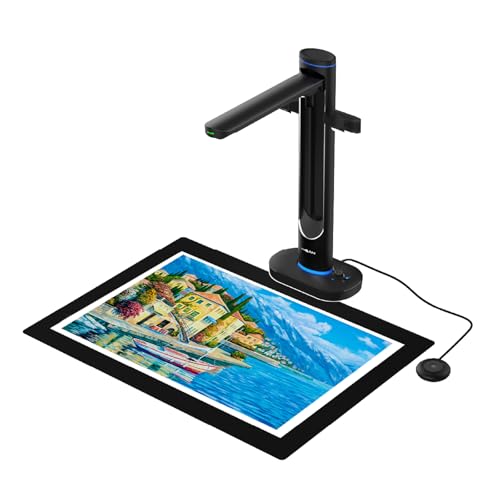
- Overhead scanning supports materials up to A2
- Dual 48MP cameras and up to 600 DPI
- OCR, text-to-speech, and UVC camera modes
Best For: Oversized, fragile, and archival materials
Best Portable Option

- Foldable, height-adjustable design weighs 2 pounds
- 24MP sensor with curved-page flattening
- Exports searchable PDFs, Word, and Excel files
Best For: Portable book and document scanning at home or on the go
Best Established Overhead Scanner

- Scans bound books without cutting or damaging them
- Automatic curve correction and multi-document detection
- Page-turning detection and timed scanning modes
Best For: Repeated scanning of books, newspapers, photos, and mixed documents
Top Professional Pick

- 24MP camera with up to 5696 × 4272 resolution
- A3 scanning with curved-page flattening
- 180+ language OCR and HDMI support
Best For: Professional A3/A4 book and document digitization
Large-Format Specialist

- A2 capture for oversized books, maps, and newspapers
- 26MP camera with software-enhanced 600 DPI
- Automatic flattening, finger removal, and page splitting
Best For: Large-format archival and document scanning
Efficient Book Digitizer

- 1.5-second-per-page scanning speed
- Curved-page flattening with 16MP camera
- 180+ language OCR and multi-item support
Best For: Fast book digitization and mixed office materials
Best Overall

- Two-second-per-page scanning with multiple output formats
- Curved-page correction using three precision laser lines
- A3/A4 support with 180+ language OCR
Best For: Fast book and document digitization with built-in lighting
Best Heavy-Duty Pick

- Interchangeable A2 and A3 scanning formats
- 26MP sensor with software-enhanced 600 DPI output
- Auto-flattening, fingerprint removal, and page repair
Best For: Oversized documents, maps, books, and mixed-format archives
Best Simple Pick

- About one-second-per-page scanning for A3 and A4 materials
- Folds to a lightweight 4-pound design with foot pedal
- Functions as both a scanner and USB document camera
Best For: Portable scanning, thinner books, teaching, and remote presentations
Best High-Resolution Pick – CZUR ET MAX
For demanding digitization projects, the CZUR ET MAX is one of the more capable professional book scanners in this group. Its 38MP sensor, A3 scanning area, curve-flattening technology, and OCR support are suited to detailed book and document work.
Best For: Bulk scanning, libraries, offices, and users who need high-resolution, searchable files from bound books.
Pros:
- 38MP CMOS sensor captures detailed images at up to 410 DPI.
- Automatically flattens curved pages without unbinding books.
- OCR supports editable and searchable Word, Excel, and PDF files in more than 180 languages.
- Supports A3 documents and Windows, macOS, and compatible Ubuntu systems.
Cons:
- Not recommended for glossy or highly reflective materials.
- Arabic OCR support is limited by operating system, and Thai and Hebrew are not supported.
The ET MAX combines strong image detail, fast 1.5-second page scanning with practiced operation, and broad file conversion options. Its HDMI output also makes it useful for live demonstrations, though users should verify their OCR language requirements before buying.
Best Large-Format Choice – VIISAN S48 Duo
The VIISAN S48 Duo is designed for oversized and delicate materials, making it a strong option among professional book scanners for archives, education, and large-format documents. Its overhead design scans up to A2 without pressing down on bindings.
Best For: Libraries, archives, schools, and professionals scanning oversized books, maps, manuscripts, and bound documents.
Pros:
- Scans books and documents up to A2 size without flattening or damaging bindings.
- Dual 48MP cameras provide detailed images at up to 600 DPI.
- AI processing helps flatten pages, remove finger marks, correct distortion, and clean backgrounds.
- Includes OCR, text-to-speech, and UVC camera functionality for teaching and presentations.
Cons:
- At 2.8 kg, it is less portable than compact document scanners.
- Requires at least 4GB of RAM, with 16GB recommended, plus available hard-drive space.
With its large capture area and dual-camera design, the S48 Duo is particularly well suited to materials that should not be pressed flat. OCR, accessibility features, and live-sharing support broaden its usefulness beyond traditional scanning.
Best Portable Option – CZUR Shine Ultra Pro
The CZUR Shine Ultra Pro offers a practical balance of portability and book-scanning capability. For shoppers comparing professional book scanners for flexible office or mobile use, its 24MP sensor, page-flattening technology, and foldable design are notable strengths.
Best For: Mobile professionals, home offices, and users who need a compact USB scanner for books and everyday documents.
Pros:
- 90-degree foldable, height-adjustable design weighs only 2 pounds.
- Pixel transformation helps flatten curved book pages.
- Exports to JPG, PDF, searchable PDF, Word, and Excel formats.
- Compatible with Windows 7 through 11 and supported macOS versions.
Cons:
- Its listed 24MP resolution is lower than the higher-resolution models in this roundup.
- Uses a USB connection rather than a standalone workflow.
The Shine Ultra Pro is a sensible choice when easy storage and transport matter as much as scanning features. It handles curved pages and common editable formats while remaining substantially lighter than larger overhead units.
Best Established Overhead Scanner – ScanSnap SV600
The ScanSnap SV600 is a dedicated overhead scanner for books, newspapers, magazines, photos, and documents. It remains a practical contender among professional book scanners because it can capture bound materials without cutting or damaging them and automates several parts of the workflow.
Best For: Users scanning books, newspapers, photos, and mixed documents who value automatic cropping, page detection, and curve correction.
Pros:
- Scans books and newspapers without cutting or damaging them.
- Automatically flattens book curves and corrects distortion.
- Multi-document detection crops and rotates several items in one scan.
- Page Turning Detection and Time Mode can streamline repeated scanning.
Cons:
- At 6.6 pounds, it is considerably heavier than the portable CZUR option.
- The listed resolution is 1200, below the high-resolution models in this roundup.
- Finger removal uses a Point Retouch function rather than being fully automatic.
The SV600 focuses on convenient overhead capture and workflow automation rather than maximum sensor resolution. Its page-turning modes and automatic corrections make it a useful fit for repeated book and mixed-media scanning sessions.
Top Professional Pick – CZUR ET24 Pro
The CZUR ET24 Pro is a strong choice among professional book scanners for users who need fast, high-resolution A3/A4 capture and dependable book-page flattening. Its 24MP camera, three-angle lighting, HDMI support, and ABBYY-powered OCR make it suitable for digitizing books, documents, magazines, receipts, and other materials.
Best For: Professionals scanning A3-size books and documents who want high resolution, broad OCR support, and flexible computer connectivity.
Pros:
- 24MP camera captures up to 5696 × 4272 resolution and 320 DPI.
- Flattening technology helps correct curved book pages.
- Supports A3-size materials and OCR in more than 180 languages.
- Works with Windows, compatible macOS versions, and Ubuntu 20.04–24.04.
Cons:
- Very glossy paper is not recommended.
- Thai and Hebrew OCR are not supported; Arabic support is limited by operating system.
- Requires a computer rather than operating as a standalone scanner.
Choose the ET24 Pro when image quality, larger-format support, and professional OCR are priorities. Its upgraded processing and HDMI connection add useful flexibility for demanding scanning workflows.
Large-Format Specialist – VIISAN S21 Book Scanner
The VIISAN S21 stands out among professional book scanners for large-format work, supporting A2 capture for oversized journals, manuscripts, newspapers, and maps. Its 26MP camera pairs with software that can flatten pages, remove fingers, repair edges, split facing pages, and convert scans into several editable formats.
Best For: Users who need A2 scanning, software-assisted book correction, and capture of unusually large documents or objects.
Pros:
- Captures A2-size materials up to 594 × 420 mm.
- 26MP resolution with software-enhanced support up to 600 DPI.
- Automatically flattens curved pages, removes fingers, and separates double-page scans.
- Supports OCR export to PDF, Word, Excel, EPUB, and text formats.
Cons:
- Bundled OfficeCam software is not compatible with ARM-based devices.
- Very glossy paper is not recommended.
- Built-in LEDs are not recommended for use in bright light.
The S21 is the more capable option for oversized materials and correction-heavy workflows. Confirm that your Windows or macOS computer uses a supported x86 or x64 architecture before buying.
Efficient Book Digitizer – CZUR ET16 Plus
The CZUR ET16 Plus is a practical entry in the professional book scanners category for high-volume book digitization. Its 16MP camera, 1.5-second-per-page scanning speed, curved-page flattening technology, and multi-language OCR are designed to streamline books as well as smaller documents and physical objects.
Best For: Users digitizing books quickly while also scanning business cards, vouchers, binders, and other items.
Pros:
- Can scan a 300-page book in about 10 minutes under the stated scanning conditions.
- Flattening technology helps correct curved book pages.
- Ten LED lights plus two supplemental lights provide broad illumination.
- OCR supports more than 180 languages.
Cons:
- Very glossy paper is not recommended.
- Thai and Hebrew OCR are not supported; Arabic support is limited by operating system.
- Uses a 16MP camera, below the resolution of the other CZUR and VIISAN options listed here.
The ET16 Plus makes the most sense when scanning speed and book-focused features matter more than maximum resolution or A2 capacity. Its broad lighting and ability to handle varied materials add versatility for office and archival tasks.
Best Overall – CZUR Aura Pro
For shoppers comparing professional book scanners, the CZUR Aura Pro is a versatile A3/A4 option with fast two-second-per-page scanning, curved-page correction, and broad OCR support. It connects by USB and works with Windows and compatible macOS systems.
Best For: Home offices, libraries, and researchers digitizing books and documents while also wanting a glare-free reading lamp.
Pros:
- Scans pages in about two seconds and exports JPG, Word, PDF, and searchable PDF files.
- OCR supports more than 180 languages, excluding Thai, Hebrew, and Arabic.
- Three laser lines help flatten curved book pages for clearer, more accurate captures.
- Built-in lamp offers four color temperatures and supplemental side lighting.
Cons:
- Requires a USB connection; Wi-Fi and Bluetooth are not supported.
- Some OCR languages, including Thai, Hebrew, and Arabic, are unavailable.
The Aura Pro is a well-rounded choice when speed, OCR, and curved-page handling matter more than wireless convenience. Its included lighting also makes it useful for reading between scanning sessions.
Best Heavy-Duty Pick – VIISAN S21 Pro A2/A3 Scanner
The VIISAN S21 Pro stands out among professional book scanners for its interchangeable A2 and A3 formats, 26MP sensor, and software-assisted book repair. Its foldable design also supports document capture, video, and selected AI-assisted visual tasks.
Best For: Researchers, educators, and offices scanning oversized newspapers, maps, books, engineering drawings, and other mixed-format materials.
Pros:
- Switches between A2 and A3 capture sizes with a foldable, telescoping design.
- 26MP sensor captures up to 5888 × 4522 pixels, with software-enhanced 600 DPI output.
- Auto-flattens pages, removes fingerprints, repairs page edges, and separates double-page spreads.
- OCR supports more than 180 languages and exports to searchable PDF, Word, Excel, ePub, and TXT.
Cons:
- 600 DPI is software-enhanced rather than optical resolution.
- Not recommended for highly glossy or glare-prone paper.
- Not compatible with ARM-based devices such as Surface Pro X.
Choose the S21 Pro when format flexibility and automated cleanup are priorities. Its large capture area and portable folding structure offer more range than a conventional A3-only scanner, though users should verify system compatibility first.
Best Simple Pick – CZUR Shine Ultra
The CZUR Shine Ultra is a lightweight choice for shoppers seeking professional book scanners that can also function as USB document cameras. It handles A3 and A4 materials, scans at roughly one second per page, and folds for easier transport.
Best For: Teachers, mobile workstations, and users scanning thinner books or flat documents at home, in classrooms, or during remote meetings.
Pros:
- Scans at about one second per page and supports documents up to A3 size.
- Works as both a scanner and document camera for platforms such as Zoom and Google Meet.
- OCR supports more than 180 languages, with smart paging and automatic cropping.
- Lightweight, 90-degree foldable design includes two-level height adjustment and a foot pedal.
Cons:
- Curved-page flattening is intended for thinner books; thicker books may require CZUR’s ET series.
- Not compatible with Android or iOS devices.
- Thai, Hebrew, and Arabic are not supported by the listed OCR system.
The Shine Ultra makes sense when portability and speed outweigh maximum book thickness or mobile-device support. Its document-camera mode adds practical value for teaching and remote demonstrations.
How We Picked These Professional Book Scanners
We selected models based on the features that matter most in sustained digitization work: image resolution, capture size, page handling, OCR support, scanning speed, software capabilities, portability, and ease of use. The lineup includes overhead scanners for bound books, large-format models for maps and newspapers, and compact document cameras for mobile or space-constrained setups.
Resolution claims are only part of the picture. A dependable scanner should also produce evenly lit images, reduce page curvature, minimize finger visibility, and offer software that makes cropping, enhancement, PDF creation, and text recognition straightforward.
Quick Comparison
| Best For | Look For |
|---|---|
| High-volume book digitization | Fast overhead capture, page-turn detection, and reliable software |
| Oversized books and documents | A2/A3 capture area, high-resolution imaging, and automatic flattening |
| Searchable archives | Built-in or bundled OCR with export to searchable PDF or editable text |
| Portable scanning | Compact design, USB power, foldable hardware, and quick setup |
| Education and accessibility | Text-to-speech, clear software controls, and rapid document sharing |
Key Buying Factors for Professional Book Scanners
Capture Size and Book Handling
Check the maximum scanning area before buying. A3 models suit most books and office documents, while A2-capable scanners are better for newspapers, artwork, maps, ledgers, and oversized volumes. If you regularly scan bound books, choose an overhead design that accommodates the spine without forcing pages flat.
Resolution and Image Quality
Higher megapixel counts can preserve small print and fine illustrations, but lighting, lens quality, and software processing are equally important. Look for even illumination, color accuracy, glare control, and dependable page-edge cropping.
Flattening, Finger Removal, and OCR
Automatic page flattening can substantially reduce editing time when scanning curved pages. Finger-removal tools are useful when holding books open, while OCR turns scans into searchable documents. Verify the supported languages and export formats if you are building a formal archive.
Software, Speed, and Connectivity
Review compatibility with your operating system and confirm whether the software supports batch scanning, automatic page detection, duplex workflows, PDF creation, and cloud or network export. USB connectivity is common, but power and workspace requirements vary.
Who Should Buy Which Professional Book Scanners?
Choose a high-resolution CZUR or VIISAN overhead model for demanding archives, libraries, research collections, and frequent book scanning. Large-format VIISAN-style scanners are the better choice for A2/A3 materials and oversized pages. The ScanSnap SV600 suits users who want a familiar overhead workflow from an established document-scanning brand.
For occasional office work, classrooms, or mobile setups, a portable CZUR Shine or Aura model can provide a practical balance of size, speed, and image quality. Buyers focused on searchable records should prioritize strong OCR and flattening tools, while users digitizing rare or fragile books should favor gentle overhead capture and avoid designs that require aggressive page pressure.